DAC Worldwide’s Fluid Coupling Cutaway (200-2082) is an actual industrial fluid coupling that has been cut away to unveil its primary internal components and to show how it operates.
The Backfilling 1 module of Simlog’s Bulldozer Personal Simulator introduces trainees to essential earthmoving tasks in a controlled, virtual setting. Operators learn how to manage blade position, material flow, and movement control to efficiently backfill trenches and depressions—skills critical on real-world construction sites.
This video demonstrates how the simulator reinforces key techniques like forward pushing, blade leveling, and maintaining smooth, consistent backfill layers. With a focus on safety, precision, and production efficiency, this module helps new operators gain confidence while reducing risk and training costs.
Simlog Mobile Crane Personal Simulator's Pole Topping Module has trainees lifting a rubber tire load onto the tops of a series of poles in order. The target pole is marked with blue rings that will turn green once the pole has been topped.
Simlog Mobile Crane Personal Simulator's Pole Placement Module has trainees carefully lift the pole off the ground and then place it into the target hole (the target changes color as the pole gets closer) while avoiding obstacles and unstable positions.
Simlog Mobile Crane Personal Simulator's Corridor Following 4 Module has trainees move the concrete bucket along the three-section, z-shaped corridor on the ground from one end to the other, keeping the bucket at a constant height directly above the corridor while controlling sway.
Advanced Edition features lift planning exercises that require a solid understanding of load charts and Signal Person training, i.e. learning to provide appropriate signals to the crane operator (to complete a lift), while at the same time teaching that crane operator to understand and follow those signals.
Simlog Mobile Crane Personal Simulator's Pick, Lift, and Place Module has trainees configure the boom angle, extension mode, and length and then place the hook in the rigging target (blue sphere) above the load. Once triggered, lift the load and place it into the target. Each trial ends when the load is sufficiently well placed (the target will turn green), the speed of the load is sufficiently small, and the operator activates the horn.
Simlog Mobile Crane Personal Simulator's Signaling Module has trainees move a load to a target destination hidden from the view of the crane operator, and so a signal person is required.
The signal person must view the lift using the dedicated signal-person display and provide hand or voice signals to the crane operator to safely move the load into the target (the target changes color as the load gets closer).
Each trial ends when the load is sufficiently well placed (the target will turn green), the speed of the load is sufficiently small, and the crane operator activates the horn. Telescope extend/retract control is disabled for this module.
Advanced Edition features lift planning exercises that require a solid understanding of load charts and Signal Person training, i.e. learning to provide appropriate signals to the crane operator (to complete a lift), while at the same time teaching that crane operator to understand and follow those signals.
Simlog Off-Highway Truck Personal Simulator's Corridor Driving 1 Module has trainees drive the truck through the corridor to the target. Each trial ends when the truck is over the target and parked (gear in Park, or gear in Neutral with parking brake engaged).
Simlog Off-Highway Truck Personal Simulator's Complete Haul Cycle 2 Module has trainees drive the truck from the dumping zone to the wheel loader. After the truck is fully loaded by the loader, return the dumping zone, dump the load and drive away.
Simlog's Reach Lift Truck Personal Simulator: Slalom 1 Forward Driving - pick up the load, drive forward through the slalom course, and place the load on the floor at the target position defined by a red outline.
Simlog's Reach Lift Truck Personal Simulator: Slalom 2 - Pick up the load, drive in reverse through the slalom course, and place the load on the floor at the target position defined by a red outline.
Pages
-
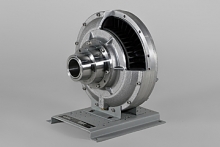 Item Number:200-2082
 -
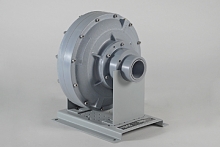 Item Number:208-110The replica duplicates all primary structural details on an actual, full-size coupling. Importantly, learners can completely disassemble and reassemble the replica, allowing them to develop skills they will use in the workplace.
 -
 Item Number:FM1000Explore Matrix TSL Fluid Mechanics training systems for hands-on experiments covering fluid behavior, pressure, flow measurement, hydraulics, and energy principles.
 -
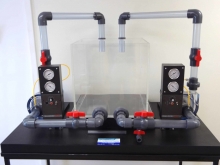 Item Number:102-PDTM2 | 102-PDTM2C | 102-VT | 102-WWTBayport's Fluids Demonstration Models are a very popular tool to teach students the sight and sound concepts of fluid flows which cannot be experienced with drawings or computer simulations.
 -
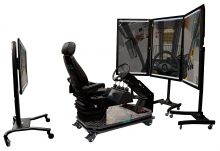 Item Number:FLTSimlog's Forklift Personal Simulator puts trainees at the controls of a typical factory forklift with rear-wheel steering. Challenging training scenarios reproduce the productivity demands of modern factory, warehouse, and distribution center environments. Our intelligent Instructional Design will guide your trainees through a series of 7 skill-building Simulation Modules that emphasize safety in every exercise.
 -
 Elevate forklift safety training with CM Labs’ Forklift Safety+ Add-On Module. Designed for experienced operators, recertification, and refreshers, it features advanced yard and warehouse scenarios for real-world readiness.
 -
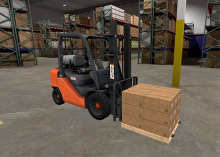 This virtual reality course from Hard Hat VR aims to deliver thorough training on the secure and productive operation of forklifts. The primary objective of this course is to educate workers on the best practices and safety procedures associated with forklift operation.
 -
 Formula AllCode from Matrix TSL helps students learn robotics, coding, sensors, Bluetooth control, and autonomous programming through hands-on activities.
 -
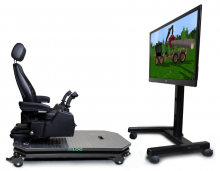 Item Number:FWDSimply set up the simulator controls , install the simulation software (in English or French) on your desktop or laptop PC, and begin! The simulation software puts you at the controls of a typical forwarder equipped with an articulated boom, telescoping extension, and free-swinging grapple attachment. You can even change the viewpoint during the simulation at the touch of a button.
 -
 Future-proof your robotic welding training with the Fronius TPS/i MIG/MAG system. Modular, intelligent, and optimized for APT/FANUC robotic welding carts. Book a demo today.