LinkedIn
X
Facebook
YouTube
Contact Tech-Labs
Search
FANUC Tablet Teach Pendant
Intuitive, visual programming for FANUC industrial and collaborative robots.
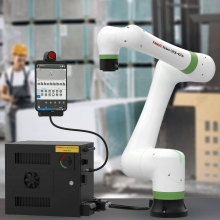
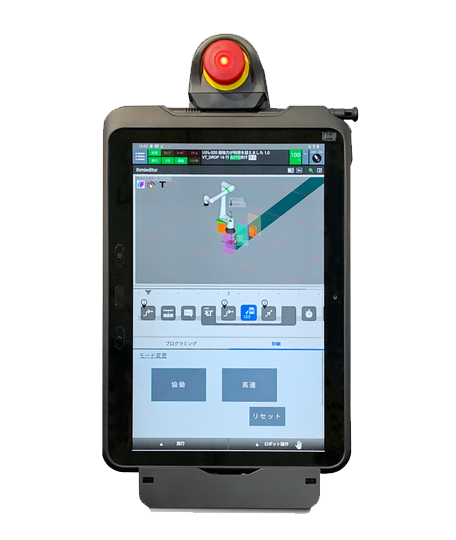
The FANUC Tablet Teach Pendant provides an intuitive, visual approach to robot programming. Its lightweight, ergonomic design and graphical interface help new users begin programming while retaining the advanced functionality needed by experienced robot operators and automation professionals.
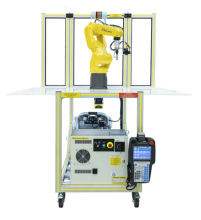
Originally associated with FANUC CRX collaborative robots, the familiar tablet interface is also available for compatible FANUC industrial robots. This creates a more consistent programming experience across collaborative and traditional industrial automation platforms.
Program FANUC robots using drag-and-drop commands, visual tools, and a familiar tablet interface.
Make Industrial Robot Programming More Approachable
Drag-and-Drop Programming
Create and modify robot programs by placing instructions along a visual timeline. Users can teach points, add motion, and build application logic through a graphical interface.
Visual Robot Control
Node maps, visual jogging, and 4D graphics help users understand robot position, direction, motion paths, frames, tooling, and safety zones.
Familiar FANUC Platform
The tablet interface gives CRX users a familiar path to programming compatible FANUC industrial robots without learning an entirely different programming environment.
Build Practical Robot Programming Skills
The FANUC Tablet Teach Pendant helps students and operators focus on robot behavior and application development through a visual interface. Users can create programs, teach positions, observe motion paths, configure application screens, and connect compatible peripheral devices.
For education and workforce training, the tablet interface can help learners progress from introductory robot operation to more advanced programming, integration, vision, and multi-axis applications.
The graphical editor allows users to build robot programs by dragging and dropping instructions onto a visual timeline.
- Create and modify robot tasks
- Teach robot positions and program points
- Add motion instructions and application logic
- View program structure in a graphical format
- Make changes without relying entirely on text-based code
Node Maps
Node maps provide a visual representation of robot motion paths and programmed points. This helps users understand the sequence and physical movement of a robot application.
Visual Jogging
Visual jogging displays robot direction and movement using a 3D model, helping users confirm the intended direction and distance before moving the robot.
FANUC’s 4D graphics help bring robot setup and application information to life through visual models.
- Visualize robot motion and programmed paths
- View tool and user frames
- Understand robot orientation and work areas
- Display safety zones and application components
- Connect programming concepts with physical robot movement
Users can create customized operator screens for their robotic applications. These screens can provide simplified controls, application status, instructions, or other information needed by an operator.
- Create application-specific HMI screens
- Present controls and information in a simplified format
- Support operator interaction with the robot application
- Adapt the interface to different training or production tasks
The Tablet Teach Pendant supports the setup and operation of compatible FANUC technologies and peripheral devices.
- Set up and modify compatible FANUC iRVision applications
- Connect approved end-of-arm tooling and accessories
- Integrate compatible grippers and peripheral devices
- Use USB connectivity for a memory device or mouse
Vision hardware, tooling, plugins, and peripheral devices are sold or configured separately unless included in a quoted robot system.
- Graphical Tablet Teach Pendant editor
- Multi-window display
- Direct access to additional axes
- Switching between robot motion groups
- Robot-path and program-point visualization
- Customizable application screens
Available functions can depend on the robot, controller, installed software, and selected system configuration.
- Robot startup and operating procedures
- Teach pendant navigation
- Robot jogging and directional movement
- Point teaching and motion programming
- Program sequencing and application logic
- Tool frames, user frames, and work areas
- Robot paths and node maps
- End-of-arm tooling and peripheral-device integration
- Vision-system setup concepts
- Application testing and troubleshooting
The Tablet Teach Pendant is associated with FANUC CRX collaborative robots and is also available for compatible FANUC standard industrial robots.
Compatibility depends on the robot model, controller, software, and system configuration. Contact Tech-Labs to confirm compatibility before specifying the Tablet Teach Pendant for a new or existing robot.
One Interface Across Collaborative and Industrial Robotics
A consistent programming interface can help educational programs introduce robot concepts on a CRX cobot and then apply similar programming methods to compatible industrial robots. This allows students to focus on application development while gaining experience across multiple FANUC robot platforms.
The Tablet Teach Pendant can support robotics, automation, mechatronics, advanced manufacturing, engineering, and workforce-development programs seeking an approachable interface without sacrificing industrial relevance.
More Information
Tech-Labs can help determine whether the FANUC Tablet Teach Pendant is appropriate for your robot, controller, training system, and curriculum.
Manufacturer: