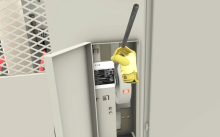
Interactive VR training for medium voltage switch operation, inspection, and maintenance—designed to strengthen electrical safety, reduce hazards, and support CTE and workforce programs.
The Backfilling 1 module of Simlog’s Bulldozer Personal Simulator introduces trainees to essential earthmoving tasks in a controlled, virtual setting. Operators learn how to manage blade position, material flow, and movement control to efficiently backfill trenches and depressions—skills critical on real-world construction sites.
This video demonstrates how the simulator reinforces key techniques like forward pushing, blade leveling, and maintaining smooth, consistent backfill layers. With a focus on safety, precision, and production efficiency, this module helps new operators gain confidence while reducing risk and training costs.
Simlog Mobile Crane Personal Simulator's Pole Topping Module has trainees lifting a rubber tire load onto the tops of a series of poles in order. The target pole is marked with blue rings that will turn green once the pole has been topped.
Simlog Mobile Crane Personal Simulator's Pole Placement Module has trainees carefully lift the pole off the ground and then place it into the target hole (the target changes color as the pole gets closer) while avoiding obstacles and unstable positions.
Simlog Mobile Crane Personal Simulator's Corridor Following 4 Module has trainees move the concrete bucket along the three-section, z-shaped corridor on the ground from one end to the other, keeping the bucket at a constant height directly above the corridor while controlling sway.
Advanced Edition features lift planning exercises that require a solid understanding of load charts and Signal Person training, i.e. learning to provide appropriate signals to the crane operator (to complete a lift), while at the same time teaching that crane operator to understand and follow those signals.
Simlog Mobile Crane Personal Simulator's Pick, Lift, and Place Module has trainees configure the boom angle, extension mode, and length and then place the hook in the rigging target (blue sphere) above the load. Once triggered, lift the load and place it into the target. Each trial ends when the load is sufficiently well placed (the target will turn green), the speed of the load is sufficiently small, and the operator activates the horn.
Simlog Mobile Crane Personal Simulator's Signaling Module has trainees move a load to a target destination hidden from the view of the crane operator, and so a signal person is required.
The signal person must view the lift using the dedicated signal-person display and provide hand or voice signals to the crane operator to safely move the load into the target (the target changes color as the load gets closer).
Each trial ends when the load is sufficiently well placed (the target will turn green), the speed of the load is sufficiently small, and the crane operator activates the horn. Telescope extend/retract control is disabled for this module.
Advanced Edition features lift planning exercises that require a solid understanding of load charts and Signal Person training, i.e. learning to provide appropriate signals to the crane operator (to complete a lift), while at the same time teaching that crane operator to understand and follow those signals.
Simlog Off-Highway Truck Personal Simulator's Corridor Driving 1 Module has trainees drive the truck through the corridor to the target. Each trial ends when the truck is over the target and parked (gear in Park, or gear in Neutral with parking brake engaged).
Simlog Off-Highway Truck Personal Simulator's Complete Haul Cycle 2 Module has trainees drive the truck from the dumping zone to the wheel loader. After the truck is fully loaded by the loader, return the dumping zone, dump the load and drive away.
Simlog's Reach Lift Truck Personal Simulator: Slalom 1 Forward Driving - pick up the load, drive forward through the slalom course, and place the load on the floor at the target position defined by a red outline.
Simlog's Reach Lift Truck Personal Simulator: Slalom 2 - Pick up the load, drive in reverse through the slalom course, and place the load on the floor at the target position defined by a red outline.
Pages
-
-
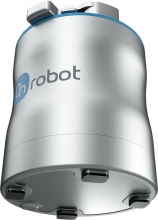 Item Number:MG10OnRobot's MG10 is a versatile, easy-to-use magnetic gripper for material handling, assembly and machine tending applications in manufacturing, automotive and aerospace environments.
 -
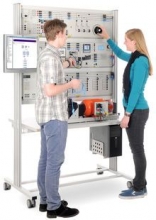 Item Number:EMG 1 / EMG 2A stand-alone power network is a type of power supply network which is closed and has no active lines coupling it to other parts of the electrical power supply grid. A stand-alone network is markedly smaller than a combined electricity grid and does not usually incorporate high-voltage power lines. For this type of network, there are two distinct modes of operation, stand-alone mode, and isolated parallel or generator-to-generator operation.
 -
 MIMBUS Discover is a turnkey VR solution for career exploration. Engage students with 16+ immersive modules across skilled trades while tracking performance in real-time with VULCAN. Ideal for CTE, K-12, and workforce programs.
 -
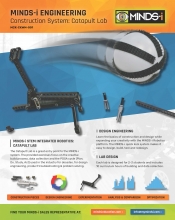 Item Number:MCK-CKWM-001The Catapult Lab is a great entry point to the MINDS-i system. The provided exercises focus on the creative build process, data collection and the PDSA cycle (Plan, Do, Study, Act) used in the industry for decades, for design engineering, product troubleshooting & problem-solving.
 -
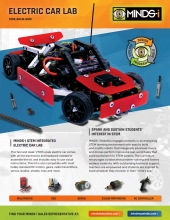 Item Number:MCK-ECLB-2WDThis fast and sleek 1/10th scale electric car comes with all the electronics and hardware needed to assemble the kit and includes easy to use visual instructions. This kit is also compatible with most hobby standard DC motors, gears, radio transmitters, servos, bodies, wheels, tires, and more.
 -
 Item Number:MCK-107P-001Prepare students for FAA Part 107 knowledge areas with the MINDS-i FAA 107 Certification Prep Course. Explore regulations, airspace, weather, safety, and UAV operations in a 45-hour program.
 -
 Item Number:CPK-W4X4-001Explore the Minds-i Search and Rescue Competition Kit, created for SkillsUSA robotics events. Learn how students can build, program, and remotely operate robots to tackle real-world rescue challenges.
 -
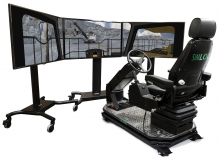 Item Number:MTModern mining equipment is increasingly complex, costly, and difficult to operate productively. As a result, proper operator training has become everyone's business. The fact is, it takes training to spot a truck and position it for loading under a full bucket. It also takes training to back up a truck just using mirrors under that bucket. Otherwise, your mining operations will suffer from lower productivity, higher fuel costs, increased tire wear, and more equipment maintenance and repair.
 -
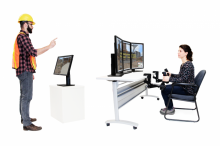 Item Number:MCRASimlog’s Advanced Edition puts you at the controls of a modern rough-terrain mobile crane equipped with telescoping boom and jib, and a variety of hook-blocks with best-in-class simulation graphics and physics, slings that go “slack”, and a boom that deflects. And now there’s wind, with parameters to define the direction, strength, and gusting.