With a payload of up to 15kg, the 3FG15 is ideal for gripping a wide range of cylindrical objects in machine-tending applications such as CNC lathe machines and offers seamless integration with the robots of your choice.
The Backfilling 1 module of Simlog’s Bulldozer Personal Simulator introduces trainees to essential earthmoving tasks in a controlled, virtual setting. Operators learn how to manage blade position, material flow, and movement control to efficiently backfill trenches and depressions—skills critical on real-world construction sites.
This video demonstrates how the simulator reinforces key techniques like forward pushing, blade leveling, and maintaining smooth, consistent backfill layers. With a focus on safety, precision, and production efficiency, this module helps new operators gain confidence while reducing risk and training costs.
Simlog Mobile Crane Personal Simulator's Pole Topping Module has trainees lifting a rubber tire load onto the tops of a series of poles in order. The target pole is marked with blue rings that will turn green once the pole has been topped.
Simlog Mobile Crane Personal Simulator's Pole Placement Module has trainees carefully lift the pole off the ground and then place it into the target hole (the target changes color as the pole gets closer) while avoiding obstacles and unstable positions.
Simlog Mobile Crane Personal Simulator's Corridor Following 4 Module has trainees move the concrete bucket along the three-section, z-shaped corridor on the ground from one end to the other, keeping the bucket at a constant height directly above the corridor while controlling sway.
Advanced Edition features lift planning exercises that require a solid understanding of load charts and Signal Person training, i.e. learning to provide appropriate signals to the crane operator (to complete a lift), while at the same time teaching that crane operator to understand and follow those signals.
Simlog Mobile Crane Personal Simulator's Pick, Lift, and Place Module has trainees configure the boom angle, extension mode, and length and then place the hook in the rigging target (blue sphere) above the load. Once triggered, lift the load and place it into the target. Each trial ends when the load is sufficiently well placed (the target will turn green), the speed of the load is sufficiently small, and the operator activates the horn.
Simlog Mobile Crane Personal Simulator's Signaling Module has trainees move a load to a target destination hidden from the view of the crane operator, and so a signal person is required.
The signal person must view the lift using the dedicated signal-person display and provide hand or voice signals to the crane operator to safely move the load into the target (the target changes color as the load gets closer).
Each trial ends when the load is sufficiently well placed (the target will turn green), the speed of the load is sufficiently small, and the crane operator activates the horn. Telescope extend/retract control is disabled for this module.
Advanced Edition features lift planning exercises that require a solid understanding of load charts and Signal Person training, i.e. learning to provide appropriate signals to the crane operator (to complete a lift), while at the same time teaching that crane operator to understand and follow those signals.
Simlog Off-Highway Truck Personal Simulator's Corridor Driving 1 Module has trainees drive the truck through the corridor to the target. Each trial ends when the truck is over the target and parked (gear in Park, or gear in Neutral with parking brake engaged).
Simlog Off-Highway Truck Personal Simulator's Complete Haul Cycle 2 Module has trainees drive the truck from the dumping zone to the wheel loader. After the truck is fully loaded by the loader, return the dumping zone, dump the load and drive away.
Simlog's Reach Lift Truck Personal Simulator: Slalom 1 Forward Driving - pick up the load, drive forward through the slalom course, and place the load on the floor at the target position defined by a red outline.
Simlog's Reach Lift Truck Personal Simulator: Slalom 2 - Pick up the load, drive in reverse through the slalom course, and place the load on the floor at the target position defined by a red outline.
Pages
-
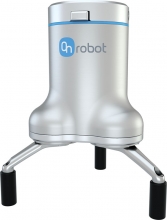 Item Number:3FG15
 -
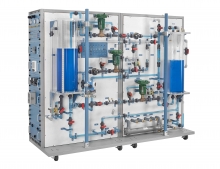 Item Number:603-000Hands-on exercises include industry-relevant process control skills, such as: setting and adjusting pressure switches; installation and calibration of an electronic flow measurement channel; and determining a temperature, pressure, level, and flow process’ operation characteristics.
 -
 Item Number:970-DRV1FTrain students and technicians on AC electronic drives using the Allen-Bradley PowerFlex 755. The Amatrol 970-DRV1F delivers hands-on VFD wiring, programming, communications, and troubleshooting with FaultPro and interactive eLearning.
 -
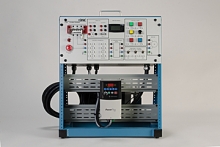 Item Number:429EDAC Worldwide’s AC Variable Frequency Drive Training System Plus (429E) examines AC variable speed drive principles. Learners will explore variable frequency AC solid-state control of 3-phase electric motors in various automation applications.
 -
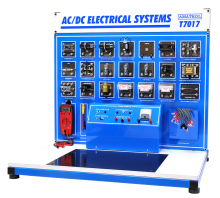 Item Number:T7017AThe model T7017A includes a bench top-mount workstation, AC power supply, DC power supply, electrical components set, lead set, hand-held multimeter, circuit tester, built-in instrumentation console, electrical circuit simulation software, student learning materials for both theory and lab, and teacher’s assessment guide. This system uses industrial quality components to help students become better prepared for what they will encounter on the job.
 -
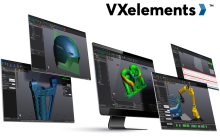 VXelements is a powerful integrated 3D scanning software platform that works in complete synergy with the entire fleet of Creaform’s 3D measurement solutions. It combines both acquisition and application modules into the same simple, easy-to-use interface, providing a complete solution rather than a simple measurement device alone.
 -
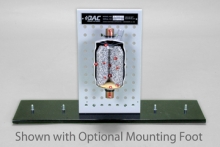 Item Number:373-601DAC Worldwide’s ACR Liquid Line Filter/Drier Cutaway is a carefully-crafted, sectioned example of a commonly-encountered liquid line filter/drier.
 -
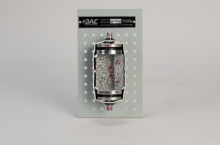 Item Number:373-602This economical, sectioned example showcases the device’s operating principle, internal components, and related installation concerns. Multiple cutaways unveil all internal components, which enhances classroom training in HVAC system design, maintenance, troubleshooting, and preventive/predictive maintenance.
 -
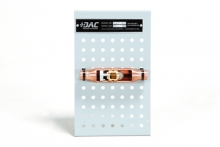 Item Number:373-510This sectioned example showcases the device’s operating principle, internal components, and related installation concerns. Color coding, flow arrows, and numbered call-outs combine to make the device more informative to the inquiring student and more useful to the instructor.
 -
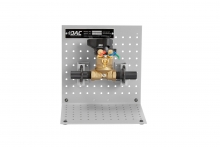 Item Number:373-551This ACR Manual Balancing Valve Cutaway provides a full cutaway view of a balancing valve that exposes the complete internal components and operating principles. The device can be used independently using an optional tabletop mounting foot, or combined with similar devices on optional display and storage frame assemblies.