Experience portable, high-performance simulation training with the CM Labs Vortex Edge Max. Deliver complete, immersive learning and real-world operator readiness from a compact, powerful system.
The Backfilling 1 module of Simlog’s Bulldozer Personal Simulator introduces trainees to essential earthmoving tasks in a controlled, virtual setting. Operators learn how to manage blade position, material flow, and movement control to efficiently backfill trenches and depressions—skills critical on real-world construction sites.
This video demonstrates how the simulator reinforces key techniques like forward pushing, blade leveling, and maintaining smooth, consistent backfill layers. With a focus on safety, precision, and production efficiency, this module helps new operators gain confidence while reducing risk and training costs.
Simlog Mobile Crane Personal Simulator's Pole Topping Module has trainees lifting a rubber tire load onto the tops of a series of poles in order. The target pole is marked with blue rings that will turn green once the pole has been topped.
Simlog Mobile Crane Personal Simulator's Pole Placement Module has trainees carefully lift the pole off the ground and then place it into the target hole (the target changes color as the pole gets closer) while avoiding obstacles and unstable positions.
Simlog Mobile Crane Personal Simulator's Corridor Following 4 Module has trainees move the concrete bucket along the three-section, z-shaped corridor on the ground from one end to the other, keeping the bucket at a constant height directly above the corridor while controlling sway.
Advanced Edition features lift planning exercises that require a solid understanding of load charts and Signal Person training, i.e. learning to provide appropriate signals to the crane operator (to complete a lift), while at the same time teaching that crane operator to understand and follow those signals.
Simlog Mobile Crane Personal Simulator's Pick, Lift, and Place Module has trainees configure the boom angle, extension mode, and length and then place the hook in the rigging target (blue sphere) above the load. Once triggered, lift the load and place it into the target. Each trial ends when the load is sufficiently well placed (the target will turn green), the speed of the load is sufficiently small, and the operator activates the horn.
Simlog Mobile Crane Personal Simulator's Signaling Module has trainees move a load to a target destination hidden from the view of the crane operator, and so a signal person is required.
The signal person must view the lift using the dedicated signal-person display and provide hand or voice signals to the crane operator to safely move the load into the target (the target changes color as the load gets closer).
Each trial ends when the load is sufficiently well placed (the target will turn green), the speed of the load is sufficiently small, and the crane operator activates the horn. Telescope extend/retract control is disabled for this module.
Advanced Edition features lift planning exercises that require a solid understanding of load charts and Signal Person training, i.e. learning to provide appropriate signals to the crane operator (to complete a lift), while at the same time teaching that crane operator to understand and follow those signals.
Simlog Off-Highway Truck Personal Simulator's Corridor Driving 1 Module has trainees drive the truck through the corridor to the target. Each trial ends when the truck is over the target and parked (gear in Park, or gear in Neutral with parking brake engaged).
Simlog Off-Highway Truck Personal Simulator's Complete Haul Cycle 2 Module has trainees drive the truck from the dumping zone to the wheel loader. After the truck is fully loaded by the loader, return the dumping zone, dump the load and drive away.
Simlog's Reach Lift Truck Personal Simulator: Slalom 1 Forward Driving - pick up the load, drive forward through the slalom course, and place the load on the floor at the target position defined by a red outline.
Simlog's Reach Lift Truck Personal Simulator: Slalom 2 - Pick up the load, drive in reverse through the slalom course, and place the load on the floor at the target position defined by a red outline.
Pages
-

-
 Portable, high-performance simulation training anywhere. The CM Labs Edge Plus delivers a comprehensive heavy equipment training solution, compatible with CM Labs' entire fleet of equipment packs and integrated with Intellia Instructor.
 -
 Experience unmatched simulation realism with the Vortex Master, CM Labs’ full-suite training simulator designed to deliver immersive, high-fidelity operator training with a motion platform, scalable displays, and interchangeable controls.
 -
 CM Labs MasterCab Simulator delivers a complete immersive training experience with professional-grade hardware, Intellia Instructor integration, and full equipment training pack compatibility.
 -
 Screen and train operators safely with CM Labs’ Vortex Trainer—an affordable, desktop-based simulator compatible with multiple Intellia training packs for flexible, portable workforce development.
 -
 Item Number:K5338-1Introduce students to welding with the Voyage™ Arc VR headset. An immersive, classroom-ready solution for safe, engaging career exploration and foundational skills training.
 -
 Item Number:VR870-ABExplore Amatrol's VR Smart Factory – Allen-Bradley (VR870-AB) for Meta Quest. Train with a digital twin Mechatronics system to build real-world Industry 4.0 skills virtually.
 -
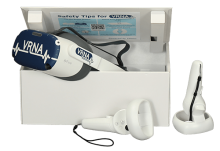 VRNA offers a fully immersive VR experience designed to enhance the efficiency and reduce the expenses associated with teaching patient care job skills typically conducted in a laboratory environment, including Certified Nursing Assistant (CNA) and Emergency Medical Services (EMS) modules.
 -
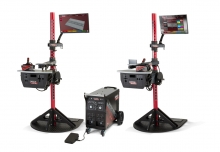 The VRTEX systems are virtual reality arc welding training simulators. These computer-based training systems are educational tools designed to supplement and enhance traditional welding training. They allow students to practice their welding technique in a simulated and immersive environment. The VRTEX systems promote the efficient transfer of quality welding skills and body positioning to the welding booth while reducing material waste associated with traditional welding training.
 -
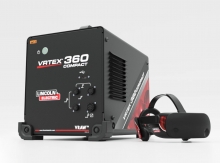 Item Number:K4914-20Lincoln Electric's VRTEX® 360 Compact is a small, portable Virtual Reality Welding Simulator for mobile use in multiple environments.