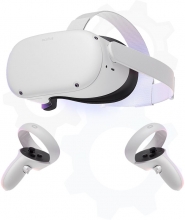
With our Workplace Safety package, you get four modules that allow learners to put safety training into practice in a safe, virtual environment.
Prepare Students for Modern Fabrication with Robotic Welding and Cutting
MOD-WELD® and MOD-CUT® systems from APT Manufacturing Solutions help schools, colleges, and workforce training centers introduce students to the next level of welding, cutting, robotics, and advanced manufacturing. Built around FANUC cobots and industrial robots, these systems help programs connect foundational fabrication skills with the automated technologies used in today’s industry.
These robotic fabrication systems can support everything from introductory CTE welding programs to advanced college-level robotics, mechatronics, and smart manufacturing labs.
Step 1: Build Welding and Cutting Fundamentals
Students begin by learning safety, materials, joint preparation, measurement, fit-up, workholding, weld quality, and cutting fundamentals.
Step 2: Introduce Robotic Processes
MOD-WELD® and MOD-CUT® help students see how manual skills transfer into automated workflows, including robot motion, torch positioning, part setup, and repeatability.
Step 3: Apply Programming and Automation Concepts
Students gain exposure to cobot programming, FANUC interfaces, offline programming, vision, seam tracking, and production-style workflows.
Step 4: Prepare for Industry Roles
Programs can connect robotic fabrication training to careers in welding, fabrication, robotics operation, automation, advanced manufacturing, and industrial maintenance.
Robotic welding and cutting do not replace foundational hands-on training. They complement it by helping students understand how welding and fabrication skills are applied in modern automated environments.
- Increase student engagement with robotics, automation, and real-world technology.
- Reinforce welding fundamentals through repeatable robotic processes.
- Teach automation readiness, including setup, programming, troubleshooting, and process control.
- Support career pathways in welding, robotics, fabrication, and advanced manufacturing.
- Help programs modernize labs while keeping manual welding instruction at the center of skill development.
For high school welding, manufacturing, STEM, and robotics programs, MOD-WELD® and MOD-CUT® systems can introduce students to automation in a way that is approachable, visual, and hands-on.
- Introduce students to robotic welding and plasma cutting careers.
- Support welding, manufacturing, engineering, robotics, and STEM pathways.
- Help students connect classroom learning to local industry needs.
- Use cobot systems to demonstrate automation concepts in a compact lab footprint.
- Build awareness of future careers before students enter college, apprenticeships, or the workforce.
Best fit: Cobot weld carts, cobot cut carts, mobile travelers, fixture tables, clamp kits, and introductory automation demonstrations.
For community colleges, technical colleges, and workforce training centers, MOD-WELD® and MOD-CUT® systems can support deeper instruction in robotic programming, production workflows, weld quality, process optimization, and industrial automation.
- Prepare students for robotic welding operator, technician, and automation support roles.
- Support advanced welding, robotics, mechatronics, and manufacturing programs.
- Demonstrate high-volume production concepts and fixture-based repeatability.
- Expose students to FANUC robots, FANUC CRX cobots, Rockwell controls, and industrial power supplies.
- Help programs align training with regional employer expectations.
Best fit: Cobot drop centers, robotic weld cells, dual-station systems, rotary tables, H-frame cells, headstock/tailstock systems, offline programming, vision, and seam tracking.
Robotic fabrication systems can support broader credentialing goals by giving students hands-on exposure to the skills used in advanced manufacturing environments. While certification requirements vary by program, MOD-WELD® and MOD-CUT® can complement training aligned to welding, robotics, automation, and manufacturing credentials.
- Robotics: Supports exposure to FANUC robot and cobot operation concepts.
- Welding: Reinforces process understanding, weld quality, fit-up, and production consistency.
- Advanced Manufacturing: Connects fabrication with automation, programming, safety, and workflow design.
- SACA Pathways: Can complement Smart Automation Certification Alliance skill areas such as industrial automation, robotics, mechatronics, and Industry 4.0 concepts.
- Workforce Readiness: Helps students build the vocabulary and confidence needed for interviews, internships, apprenticeships, and entry-level technical roles.
MOD-WELD® cobot systems are well-suited for education because they are approachable, flexible, and designed to help users learn robotic welding without starting with a large industrial cell.
- Cobot Weld Cart: A mobile training platform with an integrated work surface for classroom and lab instruction.
- Cobot Weld Traveler: A flexible option that can work with existing lab tables, fixtures, or training stations.
- Cobot Weld Drop Center: Demonstrates advanced positioning, rotation, and multi-axis welding concepts.
- Cobot Weld Bundle: Helps programs integrate a FANUC CRX cobot into a custom training environment.
MOD-CUT® systems allow students to explore robotic plasma cutting, toolpath planning, cutting parameters, part setup, and automated fabrication workflows.
- Cobot Cut Cart: Compact mobile system for classroom or lab environments.
- Cobot Cut Traveler: Supports flexible lab layouts and shared workspace environments.
- Cobot Cut Drop Center: Demonstrates advanced motion and access for complex cutting applications.
- Hypertherm Powermax SYNC®: Gives students exposure to modern plasma cutting technology used in industry.
For advanced programs, MOD-WELD® robot cells provide exposure to full-scale industrial automation and production-style robotic welding workflows.
- Single Station Fixed Wide Table: Supports foundational robotic welding instruction and fixtured work.
- Dual Station Fixed Table: Demonstrates loading on one side while the robot welds on the other.
- Dual Station Rotary Table: Introduces efficient load/unload workflows and continuous operation concepts.
- Dual Station H-Frame: Supports high-payload robotic welding demonstrations.
- Dual Station Ferris Wheel: Demonstrates ergonomic handling of longer parts.
- Headstock/Tailstock Systems: Supports training with long and large components.
Students can gain exposure to the technologies that support modern robotic fabrication, including welding power supplies, plasma cutting systems, programming tools, vision, and seam tracking.
- Miller and Fronius welding systems for industry-relevant welding process exposure.
- Hypertherm plasma cutting systems for robotic cutting applications.
- FANUC robot and cobot interfaces for programming and operation.
- Robotmaster offline programming for CAD/CAM-based workflow instruction.
- FANUC iRVision for part location and smart manufacturing concepts.
- Laser seam tracking and finding for advanced process control discussions.
A complete robotic fabrication lab includes more than the robot. Supporting equipment helps students learn setup, safety, organization, repeatability, and real-world fabrication practices.
- Downdraft weld tables and fume extraction systems for safer training spaces.
- Fixture tables and clamp kits for repeatable part setup.
- Cart accessories, storage, drawers, pegboards, and clamp hangers for lab organization.
- Collaborative positioners for teaching part rotation and weld access.
- Burn boxes and cutting accessories for robotic plasma cutting instruction.
- High school CTE welding programs
- Manufacturing and fabrication pathways
- Robotics and automation programs
- Community and technical colleges
- Workforce development and reskilling programs
- Apprenticeship and pre-apprenticeship programs
- Advanced manufacturing and Industry 4.0 labs
Build a Future-Ready Welding and Fabrication Program
Whether your program is introducing students to robotics for the first time or expanding into advanced robotic welding and cutting, Tech-Labs can help you compare systems, plan lab layouts, and select the right MOD-WELD® or MOD-CUT® configuration.
Need help choosing between a cobot cart, traveler, drop center, or full robotic weld cell? Our team can help evaluate your curriculum, lab space, budget, and workforce goals.
The MOD-WELD Drop Center Dual Axis Positioner expands what’s possible in robotic welding by combining the power of the FANUC CRX-25iA with two additional FANUC auxiliary axes. This advanced configuration allows parts to both spin and rotate during welding, giving the robot optimal access to complex geometries and hard-to-reach weld zones. In this video, you’ll see how coordinated motion between the robot and positioner improves weld quality, reduces repositioning, and enables consistent results on parts that would otherwise be difficult—or impossible—to weld efficiently. Designed for both education and real-world application, this system demonstrates how multi-axis control brings greater flexibility and precision to modern welding environments.
Pages
-
-
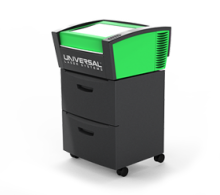 Item Number:VLS 2.30DTThe VLS2.30DT Desktop is a compact and economical entry-level platform. It offers a material processing envelope of 16" x 12" x 4" or 768 in³ and can be equipped with one 10.6µm CO2 laser source ranging in power from 10 to 30 watts or one 9.3µm CO2 30 watt laser source.
 -
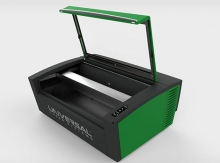 Item Number:VLS3.60DTThe VLS3.60DT is a compact and economical entry-level platform that offers a material processing envelope of 24" x 12" x 4" or 1,152 in³. The VLS3.60DT can be equipped with one of five 10.6µm CO2 laser sources ranging in power from 10 to 60 watts or one 9.3µm CO2 30 watt or 50-watt laser source.
 -
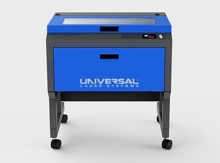 Item Number:VLS3.75The VLS3.75 is a free-standing platform with a materials processing envelope of 24" x 12" x 8.5" or 2,448 in³. The single laser platform supports a 10.6µm CO2 laser source ranging in power from 10 to 75 watts or one 9.3µm CO2 30 watt, 50 watt, or 75 watt laser source.
 -
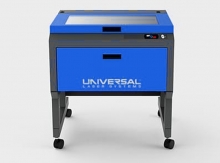 Item Number:VLS4.75The VLS4.75 is a free-standing platform with a materials processing envelope of 24" x 18" x 8.5" or 3,672 in³. The single laser platform supports a 10.6µm CO2 laser source ranging in power from 10 to 75 watts or one 9.3µm CO2 30 watt, 50 watt, or 75 watt laser source.
 -
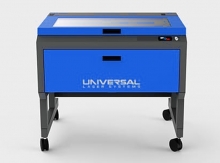 Item Number:VLS6.75The VLS6.75 is a free-standing platform with a material processing envelope of 32" x 18" x 8.5" or 4,896 in³. The single laser platform supports a 10.6µm CO2 laser source ranging in power from 10 to 75 watts or one 9.3µm CO2 30 watt, 50 watt, or 75 watt laser source.
 -
 Learn about the VMC 1300 Pro CNC Milling Machine, a precision 3-axis solution ideal for advanced educational training and industrial applications.
 -
 The CM Labs Vortex Advantage is a scalable simulator platform designed for 1-screen to 5-screen configurations, supporting full equipment control sets and immersive training experiences.
 -
 Experience portable, high-performance simulation training with the CM Labs Vortex Edge Max. Deliver complete, immersive learning and real-world operator readiness from a compact, powerful system.
 -
 Portable, high-performance simulation training anywhere. The CM Labs Edge Plus delivers a comprehensive heavy equipment training solution, compatible with CM Labs' entire fleet of equipment packs and integrated with Intellia Instructor.