Amatrol’s Portable Process Control Troubleshooting Learning System – Level & Flow (990-PC1F) provides a skill-rich, portable troubleshooting training system for two of the most common types of process control systems, flow and liquid level.
CM Labs' Rubber-Tired Gantry (RTG) Crane Simulator—now fully compatible with the Remote Operating Station (ROS)—delivers an unmatched virtual training experience. Designed to mirror the equipment used in today’s leading terminals, this simulator empowers ports and training centers to build critical skills in a safer, more efficient, and more ergonomic environment.
- Ergonomic ROS setup mirrors real-life port terminal environments
- Realistic crane behavior with collision risk awareness
- Live load path graph for real-time operator feedback
- Progressive training exercises: beginner to certification-ready
- Integrates with CM Labs’ full port training ecosystem
Instructor Monitoring and Metrics
The RTG simulator is compatible with Intellia Instructor, enabling trainers to monitor operator performance, inject training challenges, and generate detailed KPI reports remotely. It’s scalable, flexible, and built for both in-person and remote training environments.
CM Labs’ Ship-to-Shore (STS) Crane Simulator features industry-leading cable physics that replicate the real behavior of crane cables under tension and slack. This simulation doesn’t just look realistic—it behaves like the real thing.
Operators learn how to react to cable cues naturally, developing critical instincts that improve safety and efficiency on the job. Rather than relying solely on digital readouts, trainees gain a sensory-based understanding of crane operation.
- Simulates accurate cable tension and slack
- Builds sensory recognition and crane-handling instinct
- Ideal for operator onboarding and STS certification training
- Supports immersive, experiential learning
Safer Training. Smarter Operators.
With true-to-life feedback, CM Labs’ STS Crane Simulator ensures your workforce is not only trained—but prepared. Operators graduate with a deeper understanding of their equipment and their responsibilities on the terminal floor.
The Mobile Harbor Crane Simulator from CM Labs delivers a training experience that captures the full complexity of real-world cable and container dynamics. Trainees learn to control side swing, in-and-out movement, and rotator behavior with precision and confidence.
This simulation doesn’t just build mechanical skills—it develops the judgment and control necessary to land containers safely and efficiently in varied conditions.
- Realistic sideward swing and pendulum dynamics
- Rotator control for container orientation
- In-and-out cable motion training
- Immersive feedback for building muscle memory
Build Confidence. Improve Accuracy.
Operators face container behavior that reacts as it would in live operations. From swing correction to exact placement, CM Labs’ simulation tools help prevent real-world mistakes before they happen.
CM Labs’ Ship-to-Shore (STS) Crane Simulator delivers unmatched realism in container alignment training. Featuring an accurate recreation of the twist-lock mechanism, this simulator teaches operators to place containers with exactness—not approximation.
Operators learn how to visually and physically confirm alignment, developing muscle memory and awareness that translates directly to the terminal floor. This builds long-term habits that reduce error and increase safety.
- Twist-lock mechanism realistically simulated
- Training for accurate container alignment—not estimates
- Prevents the development of “close enough” habits
- Builds safe, effective operator technique and precision
Better Training = Better Results
This kind of high-fidelity simulation ensures that new hires and experienced operators alike are ready to perform with confidence, precision, and accuracy—before ever stepping foot in the cab of a real crane.
CM Labs’ Mobile Harbor Crane Simulator offers a detailed and immersive experience for bulk material handling operations. From the way the grab interacts with loose materials to realistic dust clouds and deformation, this simulator helps operators understand the nuances of working with bulk cargo.
Operators learn to react appropriately to shifting loads, anticipate how materials will respond, and optimize performance based on realistic conditions. The simulator provides a safe, repeatable, and measurable training environment for high-risk material handling.
- Realistic bulk material movement and deformation
- Dynamic dust effects that replicate working conditions
- Accurate modeling of grab impact and control
- Trains fine motor skills and environmental awareness
Train for the Unexpected
Loose cargo is unpredictable—but training doesn’t have to be. With CM Labs, your team gains hands-on practice with the kind of complex, variable scenarios they’ll face every day on the job.
The Reach Stacker Simulator by CM Labs delivers a true-to-life training experience by simulating how load distribution, height, and positioning affect vehicle stability. Operators quickly learn how their actions impact the center of gravity and how to correct unsafe behaviors before they become accidents.
This hands-on simulation creates a strong foundation in safe operation, helping operators build good habits, anticipate instability, and avoid real-world consequences.
- Accurate modeling of load placement and center of gravity
- Real-time response to improper handling or overreach
- Teaches how to prevent tipping and equipment damage
- Essential for both new trainees and experienced operators
Learn the Physics Behind the Machine
With CM Labs simulation, your team doesn't just move cargo—they understand the "why" behind every safe move. That knowledge leads to more confident operators and safer port environments.
CM Labs delivers training solutions that go beyond generic environments. With our custom yard layout simulation, you can replicate the exact layout of your terminal—including traffic flows, container stacks, lane widths, and equipment paths.
This customized environment allows operators to train in a familiar setting, shortening the learning curve and reinforcing spatial awareness, while also improving long-term efficiency and safety.
- Match your terminal’s actual layout and flow
- Enhance operator familiarity and response time
- Customize training around site-specific challenges
- Support onboarding and advanced navigation training
Train in the Environment You Work In
Give your operators a head start by training them in a layout that mirrors your actual port. With CM Labs’ custom simulator environments, they’ll learn to navigate confidently—before they ever set foot on the terminal.
Lane layout plays a critical role in operator safety and efficiency. That’s why CM Labs allows you to customize simulator lane configurations to match your real-world worksite or port environment.
From narrow lanes to multi-equipment traffic paths, operators can train in lane layouts that reflect your actual site conditions—improving confidence, reducing incidents, and accelerating readiness.
- Simulate your actual cargo lanes and drive paths
- Practice maneuvering in site-specific layouts
- Increase operational efficiency and spatial awareness
- Support precision in high-traffic, high-risk areas
Real Layout. Real Practice. Real Results.
Training operators in realistic lane configurations gives them the experience they need to handle tight spaces, navigate staging zones, and coordinate with other equipment—all without ever leaving the simulator.
CM Labs’ simulation solutions can be configured with custom control integration, enabling your team to train with hardware that mimics your exact on-site equipment. From joysticks to switch panels, we tailor control interfaces for maximum familiarity and learning efficiency.
This realism minimizes the gap between simulation and real-world operation, making onboarding faster and reducing the chance of operator error during the transition to live machinery.
- Custom control boxes and layouts to match actual equipment
- Supports specialized control schemes and multi-function joysticks
- Accelerates onboarding by removing guesswork
- Improves operator confidence and performance
From Simulator to Real Equipment—Seamlessly
Don’t just simulate the environment—simulate the feel of the job. With CM Labs’ customizable controls, your team trains with the same hardware interfaces they’ll use on the floor, field, or dock.
CM Labs’ Intellia Overhead Crane Simulator Training Pack is engineered for industrial training environments, especially for steel producers and manufacturers. This simulator delivers immersive, hands-on experience with multiple attachments, control schemes, and realistic machine behavior to help operators build critical skills in a risk-free environment.
Operators will gain practical experience managing crane movement with precision, controlling pendulum swings, and handling diverse equipment such as the C-Hook, Coil Tong, and Hoist Slab Tong. The inclusion of interactive faults and open-ended scenarios enhances problem-solving abilities and prepares users for unexpected real-world challenges.
- Attachments: C-Hook, Coil Tong, Hoist Slab Tong
- Performance Metrics: Pendulum count, cycles per hour, overloads, anti-two-block alarms, collisions
- Learning Outcomes: Precision control, equipment interaction, efficient cycle development, safety awareness
- Simulator Compatibility: Edge Plus desktop, Edge Max motion-enabled, Advantage fully immersive series
- Control Options: Cobra joysticks, control lever box, pendant controls, remote belly box
Fully compatible with CM Labs’ suite of instructor tools and other Intellia Training Packs, the Overhead Crane Simulator is a critical addition to any comprehensive industrial training program.
Pages
-
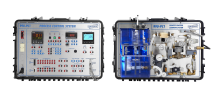 Item Number:990-PC1
 -
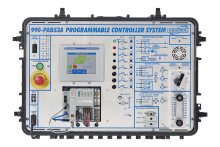 Item Number:990-PAB53AFAmatrol’s Portable PLC Troubleshooting Learning System - AB CompactLogix L16 (990-PAB53AF) teaches programmable logic controller (PLC) programming, operation, and applications used throughout industry.
 -
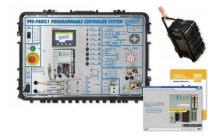 Item Number:990-PABCL1FAmatrol’s PLC Troubleshooting Learning System for the AB CompactLogix provides comprehensive PLC operation and troubleshooting knowledge in a portable format for when training space is constrained, but skill-building cannot be sacrificed! Learners will study topics like Programmable Controller Operation, PLC Ethernet Communication, Basic PLC Project Elements, PLC Motor Control, Event Sequencing, and more!
 -
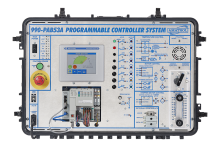 Item Number:990-PAB53AFAmatrol's 990-PAB53AF Portable PLC Troubleshooting Learning System provides a comprehensive curriculum and a cutting-edge workstation to teach PLC (Programmable Logic Controller) programming, operation, and applications used in industry. The 990-PAB53AF uses FaultPro, Amatrol’s unique electronic fault insertion, to teach PLC troubleshooting skills, such as PLC input and output testing, software testing, and application troubleshooting.
 -
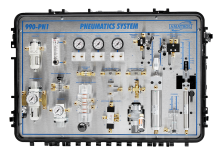 Item Number:990-PN1Amatrol's Portable Pneumatics Learning System (990-PN1) offers hands-on training in basic and intermediate pneumatic concepts. Featuring real-world components in a portable case, this system enables learners to practice cylinder operation, flow controls, valves, air motors, and gauges, fostering skill development and workforce readiness.
 -
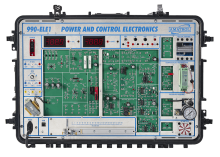 Item Number:990-ELE1Amatrol's 990-ELE1 features a various electrical components and circuits, including: AC and DC power supplies, ΔV potentiometer, thermocouples, resistive temperature detectors, thermistors, electronic sensors, solid state relays, transistor and operational amplifiers, field effect transistors, silicon-controlled rectifiers, triacs, and phase control circuits.
 -
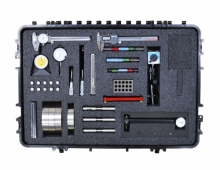 Item Number:990-PG1Amatrol’s Portable Precision Gauging Learning System (990-PG1) covers the fundamentals of basic measurement, precision measurement, direct gauging, indirect gauging, and dimensional measurements using both the U.S. customary system and the SI metric system all within a mobile, highly durable product. Measurement is a cornerstone of all technical career paths and a major part of quality assurance, which helps to keep product quality high and costs low.
 -
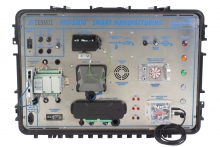 Item Number:990-SM10Amatrol's newest advanced manufacturing trainer is the Portable Smart Manufacturing Learning System (990-SM10). Developed in partnership with CESMII, this system is designed to provide hands-on learning in Smart Manufacturing and Industry 4.0 technologies.
 -
 Item Number:990-SD20Learn hands-on IIoT and smart sensor skills with Amatrol’s Portable Smart Process Sensor Training System (990-SD20). Portable, industry-relevant training in smart pressure, level, and flow sensors with interactive eLearning and real-world components
 -
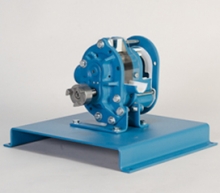 Item Number:211-140DAC Worldwide’s Positive Displacement Blower Cutaway, Rotary Lobe-Type (211-140) is a full-size, fully-detailed sectioned rotary lobe-type positive displacement compressor that provides learners a first-hand view into a component that is found in various applications worldwide.