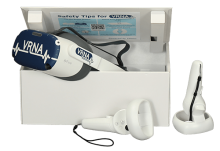
VRNA offers a fully immersive VR experience designed to enhance the efficiency and reduce the expenses associated with teaching patient care job skills typically conducted in a laboratory environment, including Certified Nursing Assistant (CNA) and Emergency Medical Services (EMS) modules.
The Backfilling 1 module of Simlog’s Bulldozer Personal Simulator introduces trainees to essential earthmoving tasks in a controlled, virtual setting. Operators learn how to manage blade position, material flow, and movement control to efficiently backfill trenches and depressions—skills critical on real-world construction sites.
This video demonstrates how the simulator reinforces key techniques like forward pushing, blade leveling, and maintaining smooth, consistent backfill layers. With a focus on safety, precision, and production efficiency, this module helps new operators gain confidence while reducing risk and training costs.
Simlog Mobile Crane Personal Simulator's Pole Topping Module has trainees lifting a rubber tire load onto the tops of a series of poles in order. The target pole is marked with blue rings that will turn green once the pole has been topped.
Simlog Mobile Crane Personal Simulator's Pole Placement Module has trainees carefully lift the pole off the ground and then place it into the target hole (the target changes color as the pole gets closer) while avoiding obstacles and unstable positions.
Simlog Mobile Crane Personal Simulator's Corridor Following 4 Module has trainees move the concrete bucket along the three-section, z-shaped corridor on the ground from one end to the other, keeping the bucket at a constant height directly above the corridor while controlling sway.
Advanced Edition features lift planning exercises that require a solid understanding of load charts and Signal Person training, i.e. learning to provide appropriate signals to the crane operator (to complete a lift), while at the same time teaching that crane operator to understand and follow those signals.
Simlog Mobile Crane Personal Simulator's Pick, Lift, and Place Module has trainees configure the boom angle, extension mode, and length and then place the hook in the rigging target (blue sphere) above the load. Once triggered, lift the load and place it into the target. Each trial ends when the load is sufficiently well placed (the target will turn green), the speed of the load is sufficiently small, and the operator activates the horn.
Simlog Mobile Crane Personal Simulator's Signaling Module has trainees move a load to a target destination hidden from the view of the crane operator, and so a signal person is required.
The signal person must view the lift using the dedicated signal-person display and provide hand or voice signals to the crane operator to safely move the load into the target (the target changes color as the load gets closer).
Each trial ends when the load is sufficiently well placed (the target will turn green), the speed of the load is sufficiently small, and the crane operator activates the horn. Telescope extend/retract control is disabled for this module.
Advanced Edition features lift planning exercises that require a solid understanding of load charts and Signal Person training, i.e. learning to provide appropriate signals to the crane operator (to complete a lift), while at the same time teaching that crane operator to understand and follow those signals.
Simlog Off-Highway Truck Personal Simulator's Corridor Driving 1 Module has trainees drive the truck through the corridor to the target. Each trial ends when the truck is over the target and parked (gear in Park, or gear in Neutral with parking brake engaged).
Simlog Off-Highway Truck Personal Simulator's Complete Haul Cycle 2 Module has trainees drive the truck from the dumping zone to the wheel loader. After the truck is fully loaded by the loader, return the dumping zone, dump the load and drive away.
Simlog's Reach Lift Truck Personal Simulator: Slalom 1 Forward Driving - pick up the load, drive forward through the slalom course, and place the load on the floor at the target position defined by a red outline.
Simlog's Reach Lift Truck Personal Simulator: Slalom 2 - Pick up the load, drive in reverse through the slalom course, and place the load on the floor at the target position defined by a red outline.
Pages
-
-
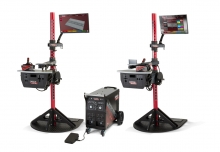 The VRTEX systems are virtual reality arc welding training simulators. These computer-based training systems are educational tools designed to supplement and enhance traditional welding training. They allow students to practice their welding technique in a simulated and immersive environment. The VRTEX systems promote the efficient transfer of quality welding skills and body positioning to the welding booth while reducing material waste associated with traditional welding training.
 -
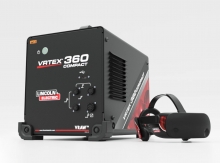 Item Number:K4914-20Lincoln Electric's VRTEX® 360 Compact is a small, portable Virtual Reality Welding Simulator for mobile use in multiple environments.
 -
 With CM Labs’ Walkaround Inspection trainees gain hands-on experience identifying issues, performing maintenance checks, and following safety protocols in a guided and measurable format. This tool builds operator confidence, reinforces safe habits, and strengthens maintenance knowledge—making it an essential part of a comprehensive training program.
 -
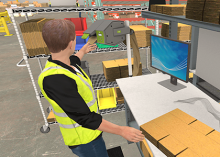 Effective packing surpasses mere item placement; it encompasses product safety, reduced shipping expenses, and the cultivation of brand loyalty. Inadequate packing practices can result in damaged goods, escalated expenses, and pose potential risks for both employees and recipients. This VR course directly confronts and addresses these challenges.
 -
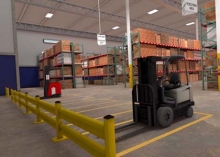 The primary goal of this course is to teach you safe work procedures to follow in a warehouse environment. You will learn how to maintain a safe warehouse and identify common hazards. The Warehouse Hazard awareness simulation is ideal for employees or supervisors who will work in or visit warehouses.
 -
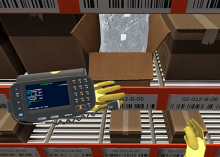 Discover the pivotal final steps of warehouse picking through VR Hard Hat's immersive Back-End Labeling course. Ensure product readiness, accurate shipment identification, and end-to-end traceability. Our course emphasizes precision in back-end labeling, minimizing logistical hurdles for efficient operations.
 -
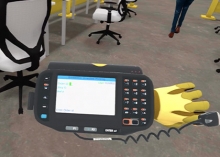 VR Hard Hat's Warehouse Picking: Case virtual reality course is meticulously designed to provide insights into the best practices of case picking, ensuring both speed and precision.
 -
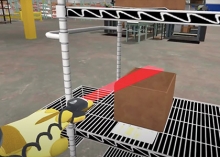 Front-end labeling, a vital component of the picking process, ensures that products are correctly identified, tracked, and dispatched. Proper labeling can reduce errors, improve efficiency, and enhance customer satisfaction. Hard Hat VR's course is designed to address the nuances of labeling at the initial stages of the picking process, ensuring that errors are minimized and efficiency is maximized.
 -
 Leveraging 25 years of industry experience, unparalleled mathematical models and the latest techniques like gamification, virtual and augmented recreations, we offer the most sophisticated immersive training solutions to prepare mariners for the real world that awaits them onboard and onshore. These simulation solutions also expedite innovation and research processes by acting as the perfect testbed for new concepts and products that then directly contribute to the decarbonization and commercialization of the solutions.