Amatrol’s Pneumatics 1 Assessment Workstation (27-PNA1) features a compact workstation designed to effectively assess hands-on pneumatics skills with a variety of industry-standard components.
The Backfilling 1 module of Simlog’s Bulldozer Personal Simulator introduces trainees to essential earthmoving tasks in a controlled, virtual setting. Operators learn how to manage blade position, material flow, and movement control to efficiently backfill trenches and depressions—skills critical on real-world construction sites.
This video demonstrates how the simulator reinforces key techniques like forward pushing, blade leveling, and maintaining smooth, consistent backfill layers. With a focus on safety, precision, and production efficiency, this module helps new operators gain confidence while reducing risk and training costs.
Simlog Mobile Crane Personal Simulator's Pole Topping Module has trainees lifting a rubber tire load onto the tops of a series of poles in order. The target pole is marked with blue rings that will turn green once the pole has been topped.
Simlog Mobile Crane Personal Simulator's Pole Placement Module has trainees carefully lift the pole off the ground and then place it into the target hole (the target changes color as the pole gets closer) while avoiding obstacles and unstable positions.
Simlog Mobile Crane Personal Simulator's Corridor Following 4 Module has trainees move the concrete bucket along the three-section, z-shaped corridor on the ground from one end to the other, keeping the bucket at a constant height directly above the corridor while controlling sway.
Advanced Edition features lift planning exercises that require a solid understanding of load charts and Signal Person training, i.e. learning to provide appropriate signals to the crane operator (to complete a lift), while at the same time teaching that crane operator to understand and follow those signals.
Simlog Mobile Crane Personal Simulator's Pick, Lift, and Place Module has trainees configure the boom angle, extension mode, and length and then place the hook in the rigging target (blue sphere) above the load. Once triggered, lift the load and place it into the target. Each trial ends when the load is sufficiently well placed (the target will turn green), the speed of the load is sufficiently small, and the operator activates the horn.
Simlog Mobile Crane Personal Simulator's Signaling Module has trainees move a load to a target destination hidden from the view of the crane operator, and so a signal person is required.
The signal person must view the lift using the dedicated signal-person display and provide hand or voice signals to the crane operator to safely move the load into the target (the target changes color as the load gets closer).
Each trial ends when the load is sufficiently well placed (the target will turn green), the speed of the load is sufficiently small, and the crane operator activates the horn. Telescope extend/retract control is disabled for this module.
Advanced Edition features lift planning exercises that require a solid understanding of load charts and Signal Person training, i.e. learning to provide appropriate signals to the crane operator (to complete a lift), while at the same time teaching that crane operator to understand and follow those signals.
Simlog Off-Highway Truck Personal Simulator's Corridor Driving 1 Module has trainees drive the truck through the corridor to the target. Each trial ends when the truck is over the target and parked (gear in Park, or gear in Neutral with parking brake engaged).
Simlog Off-Highway Truck Personal Simulator's Complete Haul Cycle 2 Module has trainees drive the truck from the dumping zone to the wheel loader. After the truck is fully loaded by the loader, return the dumping zone, dump the load and drive away.
Simlog's Reach Lift Truck Personal Simulator: Slalom 1 Forward Driving - pick up the load, drive forward through the slalom course, and place the load on the floor at the target position defined by a red outline.
Simlog's Reach Lift Truck Personal Simulator: Slalom 2 - Pick up the load, drive in reverse through the slalom course, and place the load on the floor at the target position defined by a red outline.
Pages
-
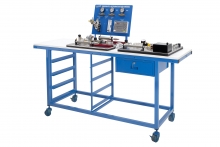 Item Number:27-PNA1
 -
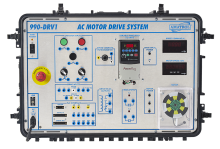 Item Number:990-DRV1FAmatrol's 990-DRV1F features industry-standard components like a Rockwell PowerFlex 4 variable frequency AC drive and a 3-phase AC motor used to teach the fundamentals of configuring and operating an AC drive. The 990-DRV1F uses FaultPro, Amatrol’s electronic fault insertion, to teach motor drive troubleshooting skills, such as drive input, motor input, and drive relay troubleshooting.
 -
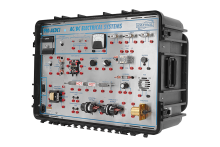 Item Number:990-ACDC1With the 990-ACDC1 learning system, you can teach the basics of AC and DC electrical systems in industrial, commercial, agricultural, and residential applications. The system offers industry-relevant skills including how to operate, install, design, and troubleshoot fundamental AC and DC electrical circuits for various purposes.
 -
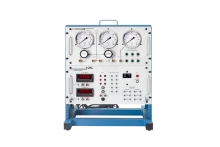 Item Number:616-000DAC’s Portable Calibration Training System (616-000) is a portable tabletop instrument calibration workstation that allows for convenient testing and calibration of instruments, process controllers, and other instrumentation and process control-related components.
 -
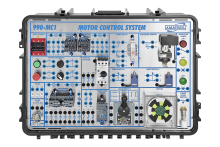 Item Number:990-MC1FSL
Amatrol’s Portable Electric Motor Control Troubleshooting Training System (990-MC1FSL) features typical industry components like a 3-phase AC squirrel cage motor. It uses 3-phase AC for power and 24 VDC for control, all packed within a space-saving, portable product. The real-world motor control components will prepare learners for work in industries where electric relay control applications are used, like conveyor control and driving large utility pumps. Teach students how to read and interpret ladder diagrams.
-
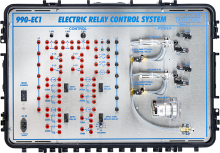 Item Number:990-EC1FAmatrol’s Portable Electric Relay Control Troubleshooting Training System (990-EC1F) covers concepts widely used in industrial, commercial, and residential applications to regulate electric motors and fluid power actuators, as well methods used for troubleshooting problems in relay control components and systems.
 -
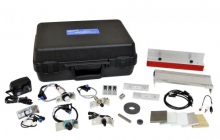 Item Number:990-SN1Amatrol's 990-SN1 includes various electronic sensors, such as capacitive proximity, inductive proximity, magnetic reed, hall-effect, and photoelectric. These sensors can be used with a provided test materials to teach how each sensor completes industrial tasks. Combined with Amatrol’s curriculum, this innovated tool provides a thorough understanding of electronic sensor applications.
 -
 Item Number:990-BH1Amatrol’s Portable Basic Hydraulics Learning System allows learners to gain skills by studying basic hydraulic circuits, pressure control circuits, hydraulic schematics, and sequence valves. The system includes a robust, portable case, eLearning curriculum, and student reference guides.
 -
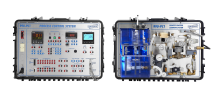 Item Number:990-PC1Amatrol’s Portable Process Control Troubleshooting Learning System – Level & Flow (990-PC1F) provides a skill-rich, portable troubleshooting training system for two of the most common types of process control systems, flow and liquid level.
 -
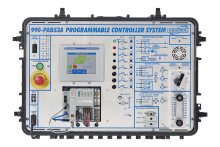 Item Number:990-PAB53AFAmatrol’s Portable PLC Troubleshooting Learning System - AB CompactLogix L16 (990-PAB53AF) teaches programmable logic controller (PLC) programming, operation, and applications used throughout industry.