Explore the Matrix TSL Fundamental Mechanics training system for hands-on instruction in statics, materials, dynamics, and mechanisms. Perform 20+ engineering experiments with modular, space-saving equipment designed for colleges, universities, and technical training programs.
The Backfilling 1 module of Simlog’s Bulldozer Personal Simulator introduces trainees to essential earthmoving tasks in a controlled, virtual setting. Operators learn how to manage blade position, material flow, and movement control to efficiently backfill trenches and depressions—skills critical on real-world construction sites.
This video demonstrates how the simulator reinforces key techniques like forward pushing, blade leveling, and maintaining smooth, consistent backfill layers. With a focus on safety, precision, and production efficiency, this module helps new operators gain confidence while reducing risk and training costs.
Simlog Mobile Crane Personal Simulator's Pole Topping Module has trainees lifting a rubber tire load onto the tops of a series of poles in order. The target pole is marked with blue rings that will turn green once the pole has been topped.
Simlog Mobile Crane Personal Simulator's Pole Placement Module has trainees carefully lift the pole off the ground and then place it into the target hole (the target changes color as the pole gets closer) while avoiding obstacles and unstable positions.
Simlog Mobile Crane Personal Simulator's Corridor Following 4 Module has trainees move the concrete bucket along the three-section, z-shaped corridor on the ground from one end to the other, keeping the bucket at a constant height directly above the corridor while controlling sway.
Advanced Edition features lift planning exercises that require a solid understanding of load charts and Signal Person training, i.e. learning to provide appropriate signals to the crane operator (to complete a lift), while at the same time teaching that crane operator to understand and follow those signals.
Simlog Mobile Crane Personal Simulator's Pick, Lift, and Place Module has trainees configure the boom angle, extension mode, and length and then place the hook in the rigging target (blue sphere) above the load. Once triggered, lift the load and place it into the target. Each trial ends when the load is sufficiently well placed (the target will turn green), the speed of the load is sufficiently small, and the operator activates the horn.
Simlog Mobile Crane Personal Simulator's Signaling Module has trainees move a load to a target destination hidden from the view of the crane operator, and so a signal person is required.
The signal person must view the lift using the dedicated signal-person display and provide hand or voice signals to the crane operator to safely move the load into the target (the target changes color as the load gets closer).
Each trial ends when the load is sufficiently well placed (the target will turn green), the speed of the load is sufficiently small, and the crane operator activates the horn. Telescope extend/retract control is disabled for this module.
Advanced Edition features lift planning exercises that require a solid understanding of load charts and Signal Person training, i.e. learning to provide appropriate signals to the crane operator (to complete a lift), while at the same time teaching that crane operator to understand and follow those signals.
Simlog Off-Highway Truck Personal Simulator's Corridor Driving 1 Module has trainees drive the truck through the corridor to the target. Each trial ends when the truck is over the target and parked (gear in Park, or gear in Neutral with parking brake engaged).
Simlog Off-Highway Truck Personal Simulator's Complete Haul Cycle 2 Module has trainees drive the truck from the dumping zone to the wheel loader. After the truck is fully loaded by the loader, return the dumping zone, dump the load and drive away.
Simlog's Reach Lift Truck Personal Simulator: Slalom 1 Forward Driving - pick up the load, drive forward through the slalom course, and place the load on the floor at the target position defined by a red outline.
Simlog's Reach Lift Truck Personal Simulator: Slalom 2 - Pick up the load, drive in reverse through the slalom course, and place the load on the floor at the target position defined by a red outline.
Pages
-

-
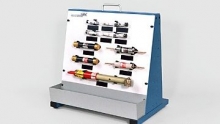 Item Number:816-PACDAC Worldwide’s Fuse Sample Board (816-PAC) is an introductory hands-on teaching aid, designed to supplement courses in fuse selection and maintenance. It includes samples of twelve (12) industrial-quality fuses for users to learn to identify.
 -
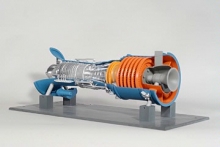 Item Number:295-301DAC Worldwide’s Gas Turbine Model (295-301) depicts a detailed to-scale model of a generic gas turbine.
 -
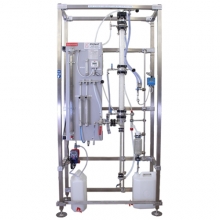 Item Number:ABS/2000The trainer allows students to study the absorption of NH3 or CO2 in water, determine the material balance of the gaseous solute, influence of operational parameters on efficiency of the column, thermal balance, packing factor, and more. Educational handbook and technical manual included.
 -
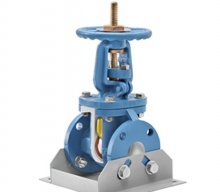 Item Number:251DAC Worldwide’s Gate Valve Cutaway (251) features an actual industrial gate valve with the complete internal configuration exposed and seal features and hardware locations retained to provide gate valve maintenance training, as well as show how the valve operates and how it is constructed.
 -
 Item Number:251KThis Dissectible allows students to disassemble and reassemble a gate valve in order to build competency in understanding how the valve works, the basic components, and routine maintenance.
 -
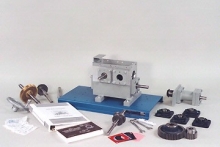 Item Number:205-000DAC Worldwide’s Gear Maintenance Training System (205-000) features a diverse selection of industrial-quality gears, shafts, and bearings that can be used in a variety of configurations. Learners will benefit from convenient hands-on training in gear identification, installation, alignment, and troubleshooting.
 -
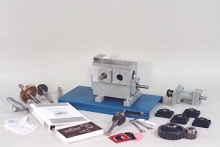 Item Number:205-PACDAC Worldwide’s Gear Maintenance Training System Plus (205-PAC) features a diverse selection of industrial-quality gears, shafts, and bearings that can be used in a variety of configurations. Learners will benefit from convenient hands-on training in gear identification, installation, alignment, and troubleshooting.
 -
 Item Number:836-PACDAC Worldwide’s Gear Sample Board (836-PAC) is an introductory hands-on teaching aid designed to supplement courses in gear selection and maintenance. It includes samples of ten (10) industrial-quality gears for users to learn to identify.
 -
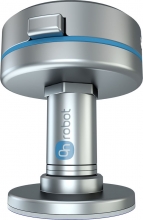 Item Number:SP1, SP3, SP5The Gecko Single Pad (SP) Gripper brings the innovative Gecko adhesive gripper technology to small-footprint applications that were previously impossible to automate. The gecko-inspired adhesive technology offers precise, no-mark gripping, even for perforated items such as circuit boards or for shiny surfaces, without the cleaning process.