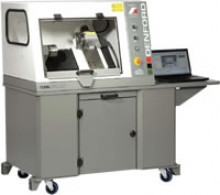
A compact 2-axis CNC Lathe with totally enclosed high-visibility interlocking guard, suitable for all levels of education and training. Programmable spindle speeds and feedrates make the Turn 270 PRO ideal for cutting a range of resistant materials such as wax, plastic, acrylic, free cutting alloys, aluminum and steel.
The Backfilling 1 module of Simlog’s Bulldozer Personal Simulator introduces trainees to essential earthmoving tasks in a controlled, virtual setting. Operators learn how to manage blade position, material flow, and movement control to efficiently backfill trenches and depressions—skills critical on real-world construction sites.
This video demonstrates how the simulator reinforces key techniques like forward pushing, blade leveling, and maintaining smooth, consistent backfill layers. With a focus on safety, precision, and production efficiency, this module helps new operators gain confidence while reducing risk and training costs.
Simlog Mobile Crane Personal Simulator's Pole Topping Module has trainees lifting a rubber tire load onto the tops of a series of poles in order. The target pole is marked with blue rings that will turn green once the pole has been topped.
Simlog Mobile Crane Personal Simulator's Pole Placement Module has trainees carefully lift the pole off the ground and then place it into the target hole (the target changes color as the pole gets closer) while avoiding obstacles and unstable positions.
Simlog Mobile Crane Personal Simulator's Corridor Following 4 Module has trainees move the concrete bucket along the three-section, z-shaped corridor on the ground from one end to the other, keeping the bucket at a constant height directly above the corridor while controlling sway.
Advanced Edition features lift planning exercises that require a solid understanding of load charts and Signal Person training, i.e. learning to provide appropriate signals to the crane operator (to complete a lift), while at the same time teaching that crane operator to understand and follow those signals.
Simlog Mobile Crane Personal Simulator's Pick, Lift, and Place Module has trainees configure the boom angle, extension mode, and length and then place the hook in the rigging target (blue sphere) above the load. Once triggered, lift the load and place it into the target. Each trial ends when the load is sufficiently well placed (the target will turn green), the speed of the load is sufficiently small, and the operator activates the horn.
Simlog Mobile Crane Personal Simulator's Signaling Module has trainees move a load to a target destination hidden from the view of the crane operator, and so a signal person is required.
The signal person must view the lift using the dedicated signal-person display and provide hand or voice signals to the crane operator to safely move the load into the target (the target changes color as the load gets closer).
Each trial ends when the load is sufficiently well placed (the target will turn green), the speed of the load is sufficiently small, and the crane operator activates the horn. Telescope extend/retract control is disabled for this module.
Advanced Edition features lift planning exercises that require a solid understanding of load charts and Signal Person training, i.e. learning to provide appropriate signals to the crane operator (to complete a lift), while at the same time teaching that crane operator to understand and follow those signals.
Simlog Off-Highway Truck Personal Simulator's Corridor Driving 1 Module has trainees drive the truck through the corridor to the target. Each trial ends when the truck is over the target and parked (gear in Park, or gear in Neutral with parking brake engaged).
Simlog Off-Highway Truck Personal Simulator's Complete Haul Cycle 2 Module has trainees drive the truck from the dumping zone to the wheel loader. After the truck is fully loaded by the loader, return the dumping zone, dump the load and drive away.
Simlog's Reach Lift Truck Personal Simulator: Slalom 1 Forward Driving - pick up the load, drive forward through the slalom course, and place the load on the floor at the target position defined by a red outline.
Simlog's Reach Lift Truck Personal Simulator: Slalom 2 - Pick up the load, drive in reverse through the slalom course, and place the load on the floor at the target position defined by a red outline.
Pages
-
-
 Learn about the Turn 370 Pro CNC Lathe, a high-capacity 2-axis machine perfect for educational and training programs requiring precision and durability.
 -
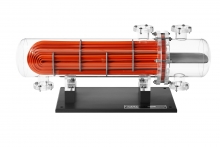 Item Number:285DAC Worldwide’s U-Tube Heat Exchanger Training Model (285) depicts a highly-detailed scale model of a common u-tube heat exchanger in a technically-accurate, professionally-crafted design. Based on a common make and model of a heat exchanger that reflects design standards established by the Tubular Exchanger Manufacturers Association (TEMA) and the ASME.
 -
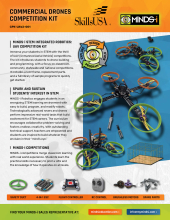 Item Number:CPK-UAM2-001Explore the MINDS-i Commercial Drones Competition Kit for hands-on UAV building, programming, tuning, and competition-based STEM learning. Designed for 2–3 students.
 -
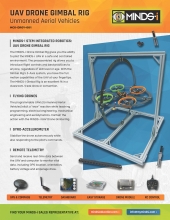 Item Number:MCK-DRGY-001The MINDS-i Drone Gimbal Rig gives you the ability to pilot the MINDS-i UAV in a safe and controlled environment. The preassembled rig allows you to introduce flight controls and best practices to anyone, regardless of skill level or age. With the Gimbal Rig’s 3-Axis system, you have the full-motion capabilities of the UAV at your fingertips. The MINDS-i Gimbal Rig is an excellent fit in a classroom, trade show, or convention.
 -
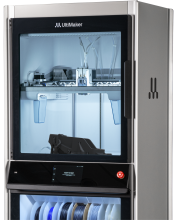 Industrial-grade, dual-extrusion 3D printer with closed heated chamber, real-time print validation, automated material handling, and high repeatability. Discover UltiMaker Factor 4 — request pricing or demo.
 -
 Dissolve PVA supports up to 4x faster with the UltiMaker PVA Removal Station. Safe, chemical-free, and efficient—engineered to reduce operator time by up to 80%.
 -
 The UltiMaker S6 delivers high-speed, dual-material 3D printing with advanced motion control, composite-ready extrusion, and a flexible build plate. Built for productivity and precision.
 -
 Meet the UltiMaker S8: The fastest desktop dual-material 3D printer with 4x productivity, enhanced accuracy, and seamless workflow integration for professional and educational environments.
 -
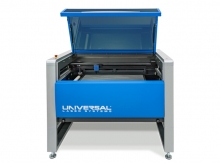 Item Number:ULTRA R5000Tech-Labs technical training solutions.