The LMV-300 CNC machine dubbed “Quicksilver” delivers high rigidity, high accuracy and high-speed machining for all your cutting needs. The entire machine’s construction stably attaches to a granite bed thus dampening vibrations and making the machine a robust system. The cornerstone of the machine is that it is literally made from stone.
The Backfilling 1 module of Simlog’s Bulldozer Personal Simulator introduces trainees to essential earthmoving tasks in a controlled, virtual setting. Operators learn how to manage blade position, material flow, and movement control to efficiently backfill trenches and depressions—skills critical on real-world construction sites.
This video demonstrates how the simulator reinforces key techniques like forward pushing, blade leveling, and maintaining smooth, consistent backfill layers. With a focus on safety, precision, and production efficiency, this module helps new operators gain confidence while reducing risk and training costs.
Simlog Mobile Crane Personal Simulator's Pole Topping Module has trainees lifting a rubber tire load onto the tops of a series of poles in order. The target pole is marked with blue rings that will turn green once the pole has been topped.
Simlog Mobile Crane Personal Simulator's Pole Placement Module has trainees carefully lift the pole off the ground and then place it into the target hole (the target changes color as the pole gets closer) while avoiding obstacles and unstable positions.
Simlog Mobile Crane Personal Simulator's Corridor Following 4 Module has trainees move the concrete bucket along the three-section, z-shaped corridor on the ground from one end to the other, keeping the bucket at a constant height directly above the corridor while controlling sway.
Advanced Edition features lift planning exercises that require a solid understanding of load charts and Signal Person training, i.e. learning to provide appropriate signals to the crane operator (to complete a lift), while at the same time teaching that crane operator to understand and follow those signals.
Simlog Mobile Crane Personal Simulator's Pick, Lift, and Place Module has trainees configure the boom angle, extension mode, and length and then place the hook in the rigging target (blue sphere) above the load. Once triggered, lift the load and place it into the target. Each trial ends when the load is sufficiently well placed (the target will turn green), the speed of the load is sufficiently small, and the operator activates the horn.
Simlog Mobile Crane Personal Simulator's Signaling Module has trainees move a load to a target destination hidden from the view of the crane operator, and so a signal person is required.
The signal person must view the lift using the dedicated signal-person display and provide hand or voice signals to the crane operator to safely move the load into the target (the target changes color as the load gets closer).
Each trial ends when the load is sufficiently well placed (the target will turn green), the speed of the load is sufficiently small, and the crane operator activates the horn. Telescope extend/retract control is disabled for this module.
Advanced Edition features lift planning exercises that require a solid understanding of load charts and Signal Person training, i.e. learning to provide appropriate signals to the crane operator (to complete a lift), while at the same time teaching that crane operator to understand and follow those signals.
Simlog Off-Highway Truck Personal Simulator's Corridor Driving 1 Module has trainees drive the truck through the corridor to the target. Each trial ends when the truck is over the target and parked (gear in Park, or gear in Neutral with parking brake engaged).
Simlog Off-Highway Truck Personal Simulator's Complete Haul Cycle 2 Module has trainees drive the truck from the dumping zone to the wheel loader. After the truck is fully loaded by the loader, return the dumping zone, dump the load and drive away.
Simlog's Reach Lift Truck Personal Simulator: Slalom 1 Forward Driving - pick up the load, drive forward through the slalom course, and place the load on the floor at the target position defined by a red outline.
Simlog's Reach Lift Truck Personal Simulator: Slalom 2 - Pick up the load, drive in reverse through the slalom course, and place the load on the floor at the target position defined by a red outline.
Pages
-
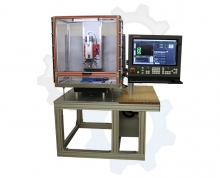 Item Number:LMV-300 CNC
 -
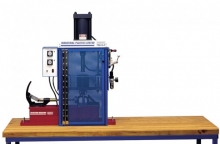 Item Number:96-PLS1TThe injection molding trainer includes a temperature control system, 4 oz. shot material feed system with electro-pneumatic control, dual heater system, barrel and nozzle, safety enclosure, heavy-duty workstation, 8-ton clamping system, mold offset plates, set of injection starter molds, interactive curriculum for both theory and lab, and a teacher’s assessment guide.
 -
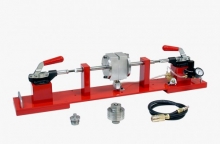 Item Number:96-PLS2The 96-PLS2 includes a clamping system, extrusion die for use with blow molding, pneumatic blow system, starter mold for blow molding, extrusion die, interactive curriculum for both theory and lab, and a teacher’s assessment guide. Students will learn skills such as creating a plastics part using a blow molding operation, troubleshooting blow molds, designing a blow mold using CAD/CAM, creating a blow mold using a CNC machine, creating a plastics part using an extrusion operation, and testing an extrusion for uniform diameter.
 -
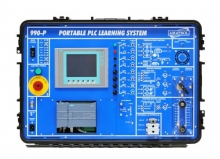 Item Number:990-PS712Inside this attractive, durable carrying case, learners will find a world-class learning system with components like the KTP 600 Human Machine Interface (HMI) panel, which allows user input and displays output data. Combined with Amatrol’s thorough curriculum, learners will gain both theoretical and hands-on knowledge that can start them on a path towards a rewarding career.
 -
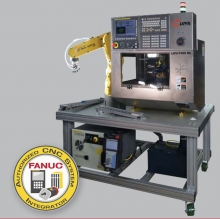 Item Number:LMV-F400 RLAn excellent teaching machine with an all in one production center. This top of the line Milling Machine includes an attached FANUC LR Mate 200iD Robot arm. With this machine, educators have everything they will need to teach students both Robot programming and CNC machining.
 -
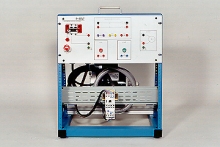 Item Number:421-000DAC Worldwide’s 1-Phase Motor Control Training System with Magnetic Starter (421-000) is a motor control-related device for training in the operational principles, wiring, fault troubleshooting, and application of industrial single-phase, magnetic motor starters.
 -
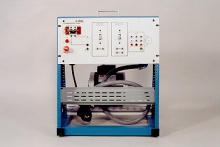 Item Number:420-000DAC Worldwide’s 1-Phase Motor Control Training System with Manual Starter (420-000) is a motor control-related device for training in the operational principles, wiring, fault troubleshooting, and application of industrial single-phase, manual (across the line) starters.
 -
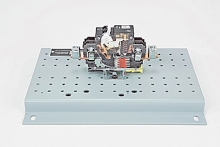 Item Number:273-907DAC Worldwide’s 100A, Single Pole Circuit Breaker Cutaway (273-907) is a detailed and professionally-crafted circuit breaker cutaway that depicts a common DIN-rail-mounted, single-phase industrial breaker. T
 -
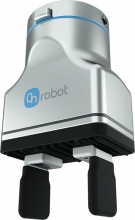 Item Number:2FG7OnRobot's 2FG7 Finger Gripper is a complete, low-cost, off-the-shelf electric parallel gripper that can be deployed on any major collaborative or light industrial robot within minutes and requires no custom engineering for installation, programming, or maintenance.
 -
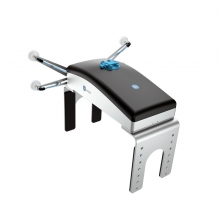 Item Number:2FGP20The OnRobot 2FGP20 electric gripper offers a wide stroke and customizable arms to easily handle containers that can’t be handled with traditional vacuum grippers. Like all OnRobot electric grippers, the 2FGP20 provides fast, out-of-the-box deployment with intuitive programming.