Explore renewable energy, battery storage, EV charging, and smart home technologies with the Smart Home Energy Trainer (123-01). This hands-on training system helps students develop real-world skills in residential energy management, grid interaction, and energy diagnostics.
The Backfilling 1 module of Simlog’s Bulldozer Personal Simulator introduces trainees to essential earthmoving tasks in a controlled, virtual setting. Operators learn how to manage blade position, material flow, and movement control to efficiently backfill trenches and depressions—skills critical on real-world construction sites.
This video demonstrates how the simulator reinforces key techniques like forward pushing, blade leveling, and maintaining smooth, consistent backfill layers. With a focus on safety, precision, and production efficiency, this module helps new operators gain confidence while reducing risk and training costs.
Simlog Mobile Crane Personal Simulator's Pole Topping Module has trainees lifting a rubber tire load onto the tops of a series of poles in order. The target pole is marked with blue rings that will turn green once the pole has been topped.
Simlog Mobile Crane Personal Simulator's Pole Placement Module has trainees carefully lift the pole off the ground and then place it into the target hole (the target changes color as the pole gets closer) while avoiding obstacles and unstable positions.
Simlog Mobile Crane Personal Simulator's Corridor Following 4 Module has trainees move the concrete bucket along the three-section, z-shaped corridor on the ground from one end to the other, keeping the bucket at a constant height directly above the corridor while controlling sway.
Advanced Edition features lift planning exercises that require a solid understanding of load charts and Signal Person training, i.e. learning to provide appropriate signals to the crane operator (to complete a lift), while at the same time teaching that crane operator to understand and follow those signals.
Simlog Mobile Crane Personal Simulator's Pick, Lift, and Place Module has trainees configure the boom angle, extension mode, and length and then place the hook in the rigging target (blue sphere) above the load. Once triggered, lift the load and place it into the target. Each trial ends when the load is sufficiently well placed (the target will turn green), the speed of the load is sufficiently small, and the operator activates the horn.
Simlog Mobile Crane Personal Simulator's Signaling Module has trainees move a load to a target destination hidden from the view of the crane operator, and so a signal person is required.
The signal person must view the lift using the dedicated signal-person display and provide hand or voice signals to the crane operator to safely move the load into the target (the target changes color as the load gets closer).
Each trial ends when the load is sufficiently well placed (the target will turn green), the speed of the load is sufficiently small, and the crane operator activates the horn. Telescope extend/retract control is disabled for this module.
Advanced Edition features lift planning exercises that require a solid understanding of load charts and Signal Person training, i.e. learning to provide appropriate signals to the crane operator (to complete a lift), while at the same time teaching that crane operator to understand and follow those signals.
Simlog Off-Highway Truck Personal Simulator's Corridor Driving 1 Module has trainees drive the truck through the corridor to the target. Each trial ends when the truck is over the target and parked (gear in Park, or gear in Neutral with parking brake engaged).
Simlog Off-Highway Truck Personal Simulator's Complete Haul Cycle 2 Module has trainees drive the truck from the dumping zone to the wheel loader. After the truck is fully loaded by the loader, return the dumping zone, dump the load and drive away.
Simlog's Reach Lift Truck Personal Simulator: Slalom 1 Forward Driving - pick up the load, drive forward through the slalom course, and place the load on the floor at the target position defined by a red outline.
Simlog's Reach Lift Truck Personal Simulator: Slalom 2 - Pick up the load, drive in reverse through the slalom course, and place the load on the floor at the target position defined by a red outline.
Pages
-
 Item Number:123-01
 -
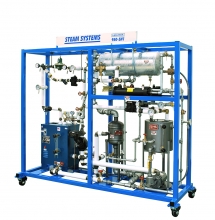 Item Number:950-SH1Amatrol’s Steam System Training System (950-SH1) introduces learners to the operation, installation, maintenance, and repair of steam systems and their application in paper mills, commercial and residential settings, power companies, and even nuclear submarines.
 -
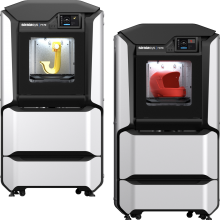 Item Number:F170 / F370The Stratasys F Series is the ultimate, all-in-one rapid prototyping system for your entire team. It combines the power of FDM with the ease of GrabCAD Print for the most versatile and intelligent solution available.
 -
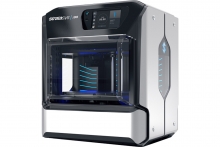 Item Number:J55The Stratasys J55 Prime 3D printer introduces full color, high fidelity with tactile, functional, and sensory capabilities - making the efficiency and quality of PolyJet Technology more affordable and office-friendly than ever.
 -
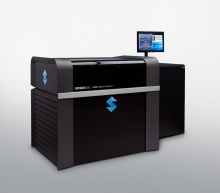 Item Number:J850 DAPThe Stratasys J850™ Digital Anatomy™ 3D Printer combines materials and software to create 3D medical models of human anatomy that mimic bone and tissue with realism you can see and feel.
 -
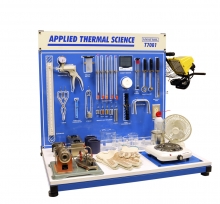 Item Number:T7081Understanding HVAC/R, geothermal, refrigeration, and steam systems requires a good hold on the basics. With Amatrol's T7081 Applied Thermal Science Trainer, you can provide the hands-on training your students or employees need.
 -
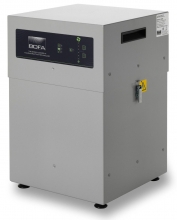
BOFA’s Advantage 350 fume extraction and filtration system effectively removes potentially harmful fumes and particulates created during the laser marking process. By maintaining a dust-free operating area, the system helps to protect valuable equipment, maintain a higher quality mark, and reduce the number of rejects and contaminants.
The quiet and compact Advantage 350 is ideal for use in light-duty laser marking applications, including schools, sign making workshops and small-scale industrial environments.
-
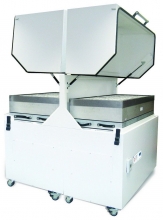
Our largest high-volume fume extractor with unique Gullwing filter access design making filter exchange quick, safe and easy.
BOFA’s AD 4000 laser fume extraction unit combines large filter capacity with high airflows. This combination makes the AD 4000 ideal for large laser engravers, laser cutters as well as multiple laser coding installations.
Easily accessible filters are accommodated by the uniquely styled gas spring assisted ‘Gull Winged’ doors, which allow for maximum space and ease when changing filters.
-
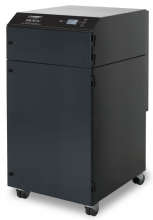
BOFA’s AD 1000 iQ high end laser extraction system combines extremely large filter capacity with high airflow and pressure rates, making it the ideal choice for heavy-duty applications that generate large amounts of particulate and gaseous organic compounds.
Performance has now been further enhanced with the inclusion of several new features including BOFA’s new iQ Operating System, making the new AD 1000 iQ one of the most advanced system available.
-
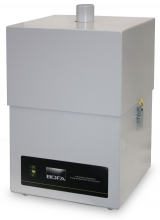 The AD Access combines economic ownership with performance to match the small laser user. A three-stage filter condition indicator is included as a standard feature, together with three stage filtration: DeepPleat pre-filter, HEPA and chemical section.