Amatrol’s 990-PTB1 Portable Pneumatics Troubleshooting Learning System teaches hands-on skills with industry-standard components, interactive curriculum, and FaultPro software for real-world troubleshooting practice.
The Backfilling 1 module of Simlog’s Bulldozer Personal Simulator introduces trainees to essential earthmoving tasks in a controlled, virtual setting. Operators learn how to manage blade position, material flow, and movement control to efficiently backfill trenches and depressions—skills critical on real-world construction sites.
This video demonstrates how the simulator reinforces key techniques like forward pushing, blade leveling, and maintaining smooth, consistent backfill layers. With a focus on safety, precision, and production efficiency, this module helps new operators gain confidence while reducing risk and training costs.
Simlog Mobile Crane Personal Simulator's Pole Topping Module has trainees lifting a rubber tire load onto the tops of a series of poles in order. The target pole is marked with blue rings that will turn green once the pole has been topped.
Simlog Mobile Crane Personal Simulator's Pole Placement Module has trainees carefully lift the pole off the ground and then place it into the target hole (the target changes color as the pole gets closer) while avoiding obstacles and unstable positions.
Simlog Mobile Crane Personal Simulator's Corridor Following 4 Module has trainees move the concrete bucket along the three-section, z-shaped corridor on the ground from one end to the other, keeping the bucket at a constant height directly above the corridor while controlling sway.
Advanced Edition features lift planning exercises that require a solid understanding of load charts and Signal Person training, i.e. learning to provide appropriate signals to the crane operator (to complete a lift), while at the same time teaching that crane operator to understand and follow those signals.
Simlog Mobile Crane Personal Simulator's Pick, Lift, and Place Module has trainees configure the boom angle, extension mode, and length and then place the hook in the rigging target (blue sphere) above the load. Once triggered, lift the load and place it into the target. Each trial ends when the load is sufficiently well placed (the target will turn green), the speed of the load is sufficiently small, and the operator activates the horn.
Simlog Mobile Crane Personal Simulator's Signaling Module has trainees move a load to a target destination hidden from the view of the crane operator, and so a signal person is required.
The signal person must view the lift using the dedicated signal-person display and provide hand or voice signals to the crane operator to safely move the load into the target (the target changes color as the load gets closer).
Each trial ends when the load is sufficiently well placed (the target will turn green), the speed of the load is sufficiently small, and the crane operator activates the horn. Telescope extend/retract control is disabled for this module.
Advanced Edition features lift planning exercises that require a solid understanding of load charts and Signal Person training, i.e. learning to provide appropriate signals to the crane operator (to complete a lift), while at the same time teaching that crane operator to understand and follow those signals.
Simlog Off-Highway Truck Personal Simulator's Corridor Driving 1 Module has trainees drive the truck through the corridor to the target. Each trial ends when the truck is over the target and parked (gear in Park, or gear in Neutral with parking brake engaged).
Simlog Off-Highway Truck Personal Simulator's Complete Haul Cycle 2 Module has trainees drive the truck from the dumping zone to the wheel loader. After the truck is fully loaded by the loader, return the dumping zone, dump the load and drive away.
Simlog's Reach Lift Truck Personal Simulator: Slalom 1 Forward Driving - pick up the load, drive forward through the slalom course, and place the load on the floor at the target position defined by a red outline.
Simlog's Reach Lift Truck Personal Simulator: Slalom 2 - Pick up the load, drive in reverse through the slalom course, and place the load on the floor at the target position defined by a red outline.
Pages
-
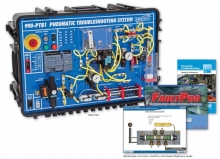 Item Number:990-PTB1
 -
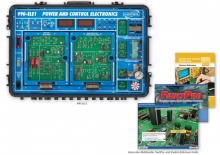 Item Number:990-ELE1Amatrol’s Portable Power and Control Electronics Learning System (990-ELE1) covers how to operate, adjust, and troubleshoot electronic components, circuits, and systems used in machine applications. The portable learning system allows for on-the-go exploration of the fundamental concepts of industrial power and control electronics, such as measuring temperature, speed, and analog signals. The 990-ELE1 provides skills and topics that will be invaluable in industries like manufacturing, transportation, energy, and construction.
 -
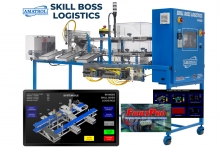 Item Number:95-MSB3The Amatrol Skill Boss Logistics offers a performance-based assessment for evaluating the skills and competencies of future supply chain automation technicians.
 -
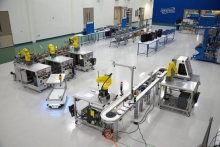 The Smart Factory is a fully connected and flexible manufacturing system that connects its physical systems, operational information, and human assets to control manufacturing, maintenance, inventory, and supply chain operations.
 -
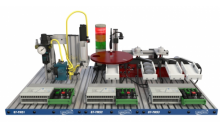 Item Number:870-PTAB82Amatrol’s Tabletop Mechatronics is a portable, durable, affordable learning system that forms a fully automated line to teach real-world mechatronics skills. This learning system features a pick-and-place, gauging, and inventory station, all of which fit on a standard tabletop!
 -
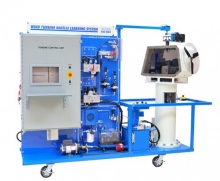 Item Number:950-TNC1Master wind turbine troubleshooting with Amatrol’s 950-TNC1 Turbine Nacelle Learning System. Train on real-world components, simulate faults, and prepare learners for advanced wind energy careers.
 -
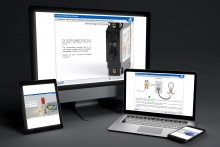 Amatrol’s virtual trainers replicate physical systems in such detail that students can build skills even when they don’t have access to actual equipment.
 -
 Offering unmatched depth and breadth of training, Amatrol’s Oil and Gas Program builds industry-relevant competencies using world-class simulators featuring industry-standard components and highly interactive curriculum. The Oil and Gas Program covers vital areas such as electrical, electronics, instrumentation and process control, and mechanical training.
 -
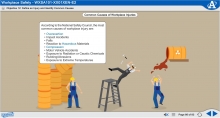 Amatrol’s Workplace Safety training courses explain the basic principles necessary to keep work environments as accident-free as possible. Learners will study the common causes of workplace accidents and the role of OSHA and other agencies regulating safety before moving to personal safety actions and awareness, such as Personal Protective Equipment, Hazardous Communication, Lockout / Tagout, and Accident Response.
 -
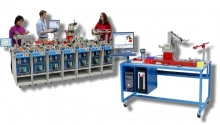 Tech-Labs offers equipment and curriculum from Amatrol’s Advanced Manufacturing program. Amatrol’s industry-leading equipment and curriculum are developed in partnership with industry to deliver job-ready, industry-relevant skills. Working closely with companies like Caterpillar, Tropicana, and many others Amatrol has designed equipment for workplace success.