Each Basic Hydraulics training system features standard industrial grade components. This attention to quality gives students experience they would normally only get on-the-job by helping them recognize industrial components and how to troubleshoot them more effectively. Components included with Basic Hydraulics are pre-mounted on circuit panels with silk-screened labels next to each, which facilitates ease of use and identification.
The Boom Truck Simulator from CM Labs is engineered in collaboration with major OEMs to deliver a hyper-realistic training experience that mirrors actual crane behavior. Trainees engage with an industry-approved curriculum that covers everything from basic controls to advanced lifting techniques, ensuring skills are transferable to real-world equipment.
Smart Training Technology™ powers the simulation, replicating boom deflection, engine behavior, and hydraulic dynamics with exceptional accuracy. Trainees develop competencies through progressive exercises such as deploying outriggers, hoisting poles, handling loads, and preparing for certification assessments—all while minimizing real-world risk.
Key Features & Benefits:
- 30-ton lifting capacity with a 110 ft (33.5 m) telescopic boom
- Best-in-class cable and lifting simulation with two hook configurations
- Progressive training curriculum from beginner to advanced levels
- Objective performance tracking on load control, safety violations, and operational efficiency
- Runs on Vortex Edge Plus, Edge Max, and Advantage simulators
CM Labs' Rubber-Tired Gantry (RTG) Crane Simulator—now fully compatible with the Remote Operating Station (ROS)—delivers an unmatched virtual training experience. Designed to mirror the equipment used in today’s leading terminals, this simulator empowers ports and training centers to build critical skills in a safer, more efficient, and more ergonomic environment.
- Ergonomic ROS setup mirrors real-life port terminal environments
- Realistic crane behavior with collision risk awareness
- Live load path graph for real-time operator feedback
- Progressive training exercises: beginner to certification-ready
- Integrates with CM Labs’ full port training ecosystem
Instructor Monitoring and Metrics
The RTG simulator is compatible with Intellia Instructor, enabling trainers to monitor operator performance, inject training challenges, and generate detailed KPI reports remotely. It’s scalable, flexible, and built for both in-person and remote training environments.
CM Labs’ Ship-to-Shore (STS) Crane Simulator features industry-leading cable physics that replicate the real behavior of crane cables under tension and slack. This simulation doesn’t just look realistic—it behaves like the real thing.
Operators learn how to react to cable cues naturally, developing critical instincts that improve safety and efficiency on the job. Rather than relying solely on digital readouts, trainees gain a sensory-based understanding of crane operation.
- Simulates accurate cable tension and slack
- Builds sensory recognition and crane-handling instinct
- Ideal for operator onboarding and STS certification training
- Supports immersive, experiential learning
Safer Training. Smarter Operators.
With true-to-life feedback, CM Labs’ STS Crane Simulator ensures your workforce is not only trained—but prepared. Operators graduate with a deeper understanding of their equipment and their responsibilities on the terminal floor.
The Mobile Harbor Crane Simulator from CM Labs delivers a training experience that captures the full complexity of real-world cable and container dynamics. Trainees learn to control side swing, in-and-out movement, and rotator behavior with precision and confidence.
This simulation doesn’t just build mechanical skills—it develops the judgment and control necessary to land containers safely and efficiently in varied conditions.
- Realistic sideward swing and pendulum dynamics
- Rotator control for container orientation
- In-and-out cable motion training
- Immersive feedback for building muscle memory
Build Confidence. Improve Accuracy.
Operators face container behavior that reacts as it would in live operations. From swing correction to exact placement, CM Labs’ simulation tools help prevent real-world mistakes before they happen.
CM Labs’ Ship-to-Shore (STS) Crane Simulator delivers unmatched realism in container alignment training. Featuring an accurate recreation of the twist-lock mechanism, this simulator teaches operators to place containers with exactness—not approximation.
Operators learn how to visually and physically confirm alignment, developing muscle memory and awareness that translates directly to the terminal floor. This builds long-term habits that reduce error and increase safety.
- Twist-lock mechanism realistically simulated
- Training for accurate container alignment—not estimates
- Prevents the development of “close enough” habits
- Builds safe, effective operator technique and precision
Better Training = Better Results
This kind of high-fidelity simulation ensures that new hires and experienced operators alike are ready to perform with confidence, precision, and accuracy—before ever stepping foot in the cab of a real crane.
CM Labs’ Mobile Harbor Crane Simulator offers a detailed and immersive experience for bulk material handling operations. From the way the grab interacts with loose materials to realistic dust clouds and deformation, this simulator helps operators understand the nuances of working with bulk cargo.
Operators learn to react appropriately to shifting loads, anticipate how materials will respond, and optimize performance based on realistic conditions. The simulator provides a safe, repeatable, and measurable training environment for high-risk material handling.
- Realistic bulk material movement and deformation
- Dynamic dust effects that replicate working conditions
- Accurate modeling of grab impact and control
- Trains fine motor skills and environmental awareness
Train for the Unexpected
Loose cargo is unpredictable—but training doesn’t have to be. With CM Labs, your team gains hands-on practice with the kind of complex, variable scenarios they’ll face every day on the job.
The Reach Stacker Simulator by CM Labs delivers a true-to-life training experience by simulating how load distribution, height, and positioning affect vehicle stability. Operators quickly learn how their actions impact the center of gravity and how to correct unsafe behaviors before they become accidents.
This hands-on simulation creates a strong foundation in safe operation, helping operators build good habits, anticipate instability, and avoid real-world consequences.
- Accurate modeling of load placement and center of gravity
- Real-time response to improper handling or overreach
- Teaches how to prevent tipping and equipment damage
- Essential for both new trainees and experienced operators
Learn the Physics Behind the Machine
With CM Labs simulation, your team doesn't just move cargo—they understand the "why" behind every safe move. That knowledge leads to more confident operators and safer port environments.
CM Labs delivers training solutions that go beyond generic environments. With our custom yard layout simulation, you can replicate the exact layout of your terminal—including traffic flows, container stacks, lane widths, and equipment paths.
This customized environment allows operators to train in a familiar setting, shortening the learning curve and reinforcing spatial awareness, while also improving long-term efficiency and safety.
- Match your terminal’s actual layout and flow
- Enhance operator familiarity and response time
- Customize training around site-specific challenges
- Support onboarding and advanced navigation training
Train in the Environment You Work In
Give your operators a head start by training them in a layout that mirrors your actual port. With CM Labs’ custom simulator environments, they’ll learn to navigate confidently—before they ever set foot on the terminal.
Lane layout plays a critical role in operator safety and efficiency. That’s why CM Labs allows you to customize simulator lane configurations to match your real-world worksite or port environment.
From narrow lanes to multi-equipment traffic paths, operators can train in lane layouts that reflect your actual site conditions—improving confidence, reducing incidents, and accelerating readiness.
- Simulate your actual cargo lanes and drive paths
- Practice maneuvering in site-specific layouts
- Increase operational efficiency and spatial awareness
- Support precision in high-traffic, high-risk areas
Real Layout. Real Practice. Real Results.
Training operators in realistic lane configurations gives them the experience they need to handle tight spaces, navigate staging zones, and coordinate with other equipment—all without ever leaving the simulator.
CM Labs’ simulation solutions can be configured with custom control integration, enabling your team to train with hardware that mimics your exact on-site equipment. From joysticks to switch panels, we tailor control interfaces for maximum familiarity and learning efficiency.
This realism minimizes the gap between simulation and real-world operation, making onboarding faster and reducing the chance of operator error during the transition to live machinery.
- Custom control boxes and layouts to match actual equipment
- Supports specialized control schemes and multi-function joysticks
- Accelerates onboarding by removing guesswork
- Improves operator confidence and performance
From Simulator to Real Equipment—Seamlessly
Don’t just simulate the environment—simulate the feel of the job. With CM Labs’ customizable controls, your team trains with the same hardware interfaces they’ll use on the floor, field, or dock.
Pages
-
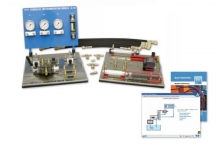 Item Number:BH-85
 -
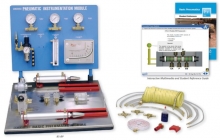 Item Number:85-BPAmatrol’s Basic Pneumatics training system (85-BP) introduces pneumatic principles through a combination of Amatrol’s top-flight multimedia curriculum with hands-on industrial pneumatic skill-building. Topics covered in this learning system include single-acting cylinder circuits, pressure vs. cylinder force, and flow control valves, while the panels can be used to practice skills such as connecting and operating a needle valve to control actuator speed.
 -
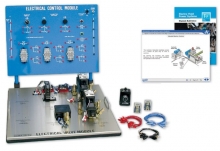 Item Number:85-EHThe Electro-Hydraulics training system includes an electrical control panel with relay control components and an electrical valve module with solenoid-operated hydraulic directional control valves and electrical/electronic sensors. These components will be used to study a variety of topics including electrical control systems, basic control devices, power devices, control relays, sequencing control, timer control, pressure control applications, and circuit applications.
 -
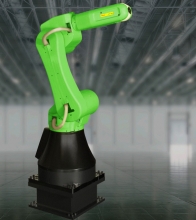 Item Number:CR-35iAFANUC’s new CR-35iA is the world’s first collaborative robot with a payload capacity of up to 35 kg. Fenceless, it opens a whole new world of possibilities. Working safely side by side with human operators, it is space as well as cost saving. And because inside it’s like any other FANUC robot, it operates like all FANUC robots. Certified to meet the requirements of ISO 10218-1:2011 and RIA/ANSI R15.06-2012, FANUC’s CR-35iA collaborative robot can work in a variety of applications alongside human workers including: machine tending, handling heavy payloads that require lift assist devices or custom equipment, higher payload mechanical assembly, palletizing or packing, and tote or carton handling.
 -
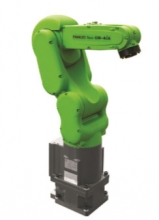 Item Number:CR-4iACR-4iA is a small collaborative robot with 4 kg payload
 -
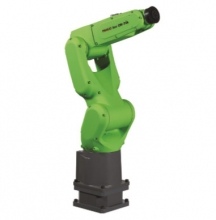 Item Number:CR-7iAThe FANUC CR-7iA is FANUC's newest collaborative robot resembles the LR Mate family. Painted green to show it's ability to work beside humans, you can expect the same reliability as FANUC's yellow robots. The CR-7iA is ideal for small part sorting and assembly, inspection, machine tending, and part delivery. It has a 7 kg payload, 717 mm reach, and is equipped with iRVision and Force Sensing. There are a variety of mounting options such as floor, wall, and ceiling.
 -
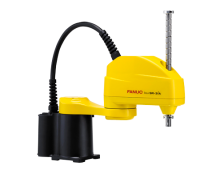 FANUC’s new SCARA robots are ideal for high-speed, precision applications such as assembly, pick and place, testing/inspection and packaging processes.
 -
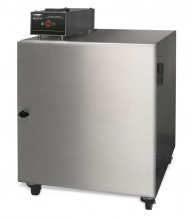
In the rare event that a burning ember or spark is drawn into the fume extraction unit, there is the possibility that debris in the filters could ignite. Although any resultant fire would typically be retained within the fume extraction unit, this would cause significant damage and in extreme circumstances, the risk may extend beyond the extraction unit. For processes where such risks have been identified, additional protection in the form of an in-line firebox is an additional precaution.
-
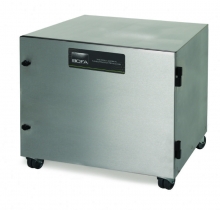
The BOFA inline pre-filter 1000 has been designed specifically for applications that generate high amounts of dust or particulate.
This inline filter unit is positioned alongside the main BOFA fume filtration system to increase the overall filter capacity and extend the life of the main filters. The DeepPleat DUO pre-filter incorporates a massive drop-out chamber within the filter, having a volume area of 15ltrs. Above the drop-out chamber but still within the housing there is a sealed 200mm deep pleat layer of F8 media giving a surface area in excess of 30 sq meters.
-
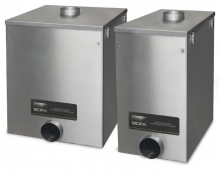 The BOFA inline prefilters have been designed specifically for applications that generate high amounts of dust or particulate.