LinkedIn
X
Facebook
YouTube
Contact Tech-Labs
Search

Robotics Apprenticeship Training
Apprenticeship & Pre-Apprenticeship Training
Build the Skills to Program, Operate and Support Robotic Systems
Connect robot programming with practical experience in motion, tooling, safety, material handling and automation.
Tech-Labs helps schools, colleges, employers and training providers plan robotics labs that support related technical instruction and hands-on skill development. Build a pathway from introductory robot operation to application development and system integration, guided by the tasks your employer partners need learners to perform.
Turn Robot Programming into Workplace Skills
A successful robotic application depends on more than moving an arm between two points. Learners need to understand operating modes, coordinate frames, tooling, inputs and outputs, and the safeguards that govern system use.
A coordinated lab lets learners create programs, test sequences, observe system behavior and troubleshoot problems in a structured environment. Pair technical instruction with repeated practice so learners can explain what a program does, demonstrate the task and document their results.
Pre-Apprenticeship Foundations
Introduce robot components, safe work practices, teach-pendant navigation and simple material-handling tasks. Guided projects help learners connect programming concepts with visible robot movement.
Apprenticeship Technical Instruction
Progress into frames, motion instructions, tooling, I/O, troubleshooting and integrated applications. Select training activities that reflect your program's competencies and the robotic systems used by employer partners.
What Should a Robotics Training Lab Cover?
- Robot safety: operating modes, work areas, safeguarding, emergency stops and energy-control procedures.
- System components: robot arm, controller, teach pendant, tooling and application equipment.
- Robot operation: startup, shutdown, jogging and controlled program execution.
- Programming: positions, coordinate frames, motion instructions, program flow and testing.
- End-of-arm tooling: grippers, tool setup and appropriate part-handling methods.
- Inputs and outputs: signals between the robot, sensors and connected equipment.
- Simulation and troubleshooting: evaluating programs, identifying faults and verifying corrections.
- Advanced applications: compatible vision, PLC communication, machine tending or other employer-defined projects.
Advanced capabilities depend on the selected hardware, software and training package. Build the lab around the skills learners need to demonstrate.
A Practical Progression for Robotics Training
Stage 1: Establish the Foundations
Begin with robot-system components, operating modes, safe work areas and energy control. Introduce teach-pendant navigation and supervised jogging before learners create programs. Include electrical, mechanical and pneumatic fundamentals where they support the selected applications.
Stage 2: Develop Operation and Programming Skills
Teach positions, frames, motion instructions and program flow. Use simple pick-and-place activities to practice point teaching, testing and refinement. Simulation can help learners explore a sequence before testing it on the physical system.
Stage 3: Build Complete Applications
Add appropriate tooling, sensors and I/O. Learners can coordinate part handling, verify device states and respond to application conditions. Introduce compatible vision or PLC connections when those technologies support your employer-defined learning objectives.
Stage 4: Troubleshoot and Demonstrate Competency
Use practical tasks to assess program creation, operation and problem solving. Ask learners to identify symptoms, review the sequence, isolate the cause and verify the correction. Include documentation, backups and an explanation of the safeguards used for the task.
Representative Robotics Training Systems
FANUC education systems offer options for collaborative and industrial robot instruction. APT's advanced training cells can extend the pathway into robot and PLC integration. Select the platform and workcell around your curriculum, learner readiness and available space.
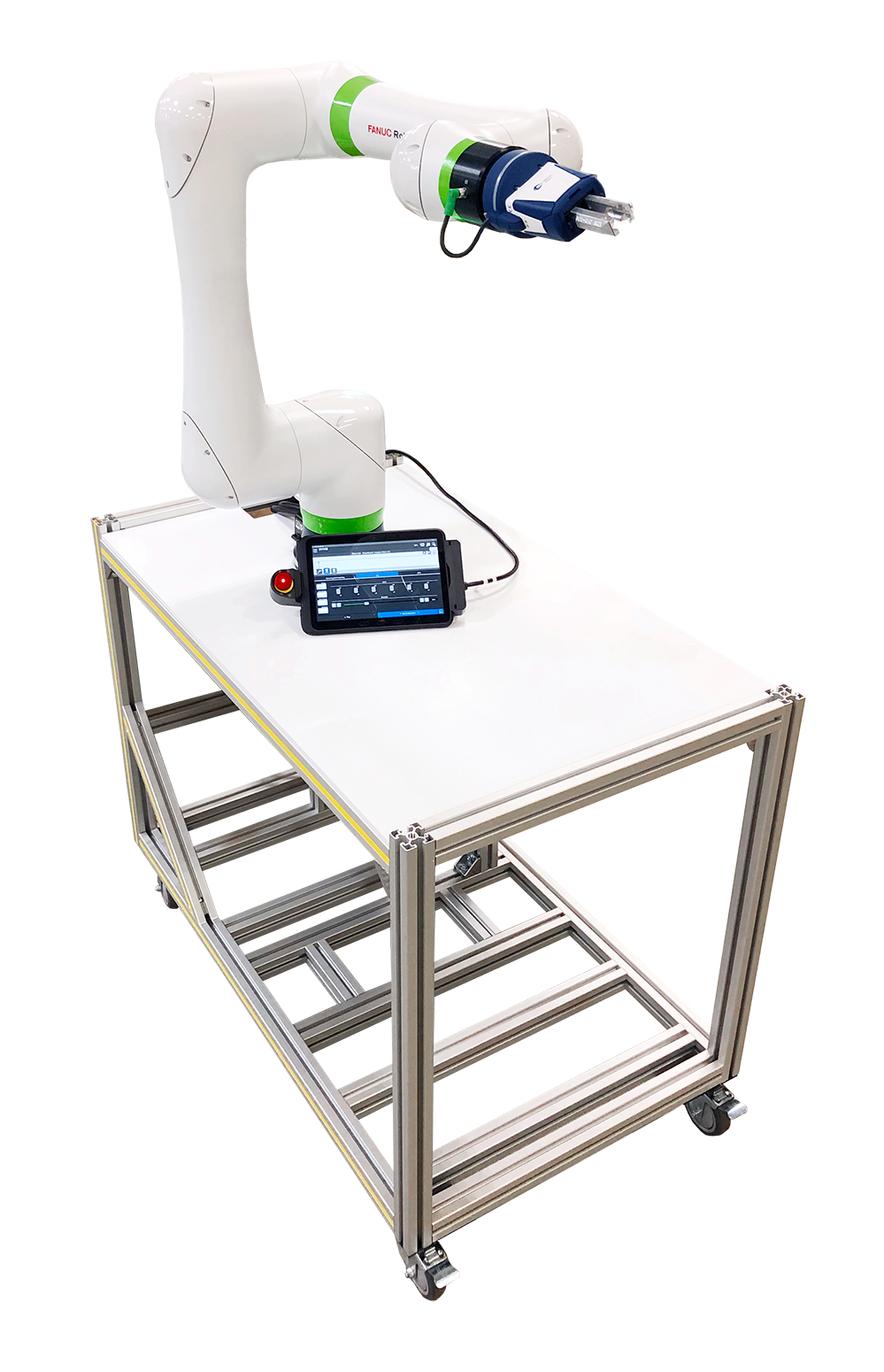
FANUC CRX Collaborative Robotics
The Fenceless CRX CERT Cart supports collaborative robot operation, tablet-based programming and lead-through teaching. It provides a platform for material-handling projects and instruction in collaborative application setup.
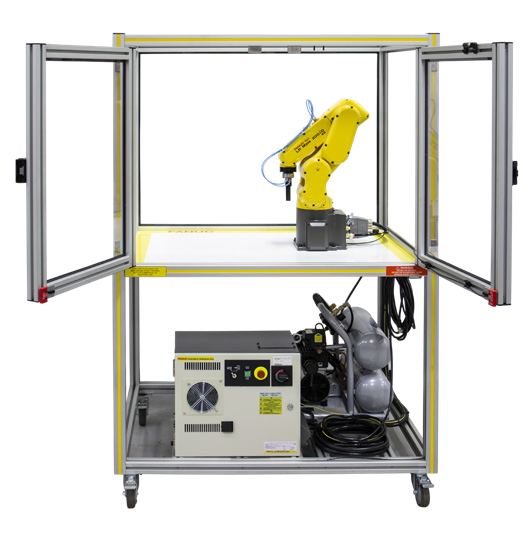
Enclosed Industrial Robot Training
The Enclosed ER-4iA CERT Cart supports industrial robot operation, programming and material handling within a defined work area. Its interlocked enclosure provides a practical setting for teaching safeguarded robot operation.

Industrial Robotics & Integrated Safety
The Fenceless ER-4iA CERT Cart combines industrial robot instruction with FANUC Dual Check Safety and an integrated safety laser scanner. Learners can explore monitored work areas alongside programming and application tasks.
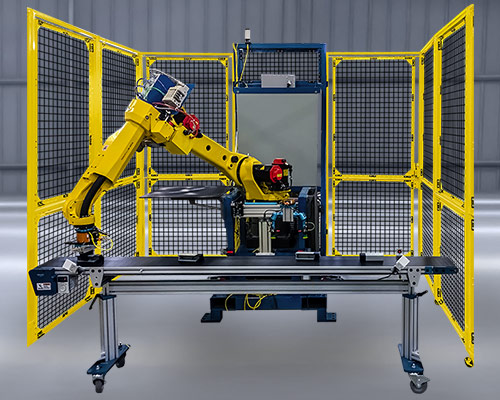
Advanced Robot & PLC Integration
APT's AM-CERT cell supports instruction that connects a FANUC robot with PLC communication and application tooling. It is an option for programs progressing toward more complex manufacturing automation projects.
These are representative systems, not a fixed equipment package. Robot models, tooling, vision, simulation licenses, curriculum and instructor training vary by configuration and should be confirmed when planning your lab.
Choose the Robot Around the Application
A collaborative robot can introduce tablet programming and lead-through teaching. An enclosed industrial training cart can emphasize conventional robot operation within an interlocked work area. Fenceless industrial systems provide opportunities to teach monitored safety zones and integrated safeguards.
Consider the complete task: the robot, tooling, parts, motion and surrounding equipment all affect how the application should be safeguarded. Review the intended training activities and lab layout when selecting a workcell.
Connect Training with Industry Credentials
FANUC and NOCTI robotics certification options can help programs assess robot operation, programming and related technical skills. Plan the intended credential alongside instructor preparation, curriculum, equipment and assessment requirements.
SACA Custom Specialist Certifications may also support the broader automation and maintenance competencies in your program. Review the competencies you want learners to demonstrate when selecting training and assessment resources.
Plan Around Your Employers, Learners and Lab
Start with the robot platforms, applications and job tasks used by your employer partners. Decide what learners should be able to do independently, then identify the instruction, supervised practice and assessments needed to develop those skills.
Tech-Labs can help you explore training systems, curriculum, instructor training and implementation support. Planning can address learner access, workcell placement, utilities, software and future expansion.
- Which robot platforms and applications matter to your employer partners?
- Are learners preparing for operation, programming, maintenance or integration tasks?
- How many learners need access to physical robots and simulation software?
- What instructor preparation and assessment resources are needed?
- Which existing PLC, mechatronics or machining systems could support future projects?
Robotics Apprenticeship Training FAQs
Should we start with a collaborative robot or an industrial robot?
Choose the platform around your employer partners' equipment and the tasks learners need to perform. Collaborative robots can support tablet programming and lead-through teaching, while industrial systems support conventional robot operation and workcell practices. Both can contribute to a broader robotics pathway.
Can we begin with one robot training cart?
Yes. A focused workcell can support introductory operation, programming and material handling. Plan learner rotations, simulation access and instructor supervision so each learner receives meaningful practice. Expansion can follow your curriculum and enrollment needs.
Can simulation replace hands-on robot training?
Simulation can support programming practice and help learners evaluate sequences. Physical training adds experience with teach pendants, tooling, workcell procedures and actual equipment behavior. A coordinated program uses each method for the skills it can develop.
Does a collaborative robot application need safeguarding?
Safeguarding should be determined for the complete application. Tooling, parts, movement and surrounding equipment can introduce hazards even when a robot is designed for collaborative operation. Include application review and safe operating procedures in lab planning and instruction.
Can these systems support pre-apprenticeship and apprenticeship instruction?
Yes, when activities match learner readiness and program objectives. Introductory learners can focus on components, safety and basic operation. Apprentices can progress into programming, tooling, troubleshooting and integrated applications.
Does buying a CERT cart automatically provide student certification?
No. Equipment supports training, while certification has separate preparation and assessment requirements. Confirm the selected credential, instructor requirements, curriculum, testing arrangements and any associated resources when planning your program.
Let's Plan Your Robotics Training Program
Tell us about your learners, employer partners, existing equipment and training goals. Tech-Labs can help you explore a practical robotics lab and the resources needed to support your next stage of instruction.