LinkedIn
X
Facebook
YouTube
Contact Tech-Labs
Search

SimSpray 3.0 Abrasive Blasting Information & Parts Guide
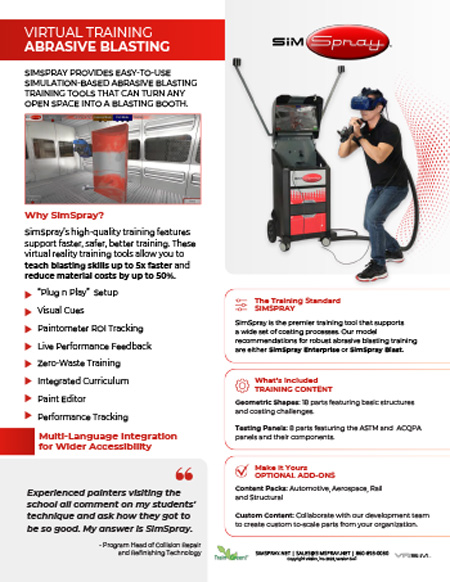
Turn an open training area into a virtual blasting booth with immersive, simulation-based abrasive blasting practice.
SimSpray 3.0 helps instructors teach blasting technique without consuming blast media or preparing a physical workpiece for every repetition. Visual cues, live feedback, integrated curriculum, and performance tracking give learners objective information they can use to adjust their approach.
Abrasive Blasting Training Features
- Plug-and-play system setup
- Visual technique cues and live performance feedback
- Zero-waste virtual practice
- Integrated curriculum and performance tracking
- Paintometer® return-on-investment tracking
- Material editor and multilanguage support
Included Blasting Content
The guide covers 18 geometric shapes and eight ASTM and ACQPA testing panels. Available blast media include garnet, plastic, sodium bicarbonate, and steel. Optional Automotive, Aerospace, Rail, and Structural content packs extend training into industry-specific parts.
Recommended SimSpray Models
VRSim recommends SimSpray Blast or SimSpray Enterprise for comprehensive abrasive blasting instruction. According to VRSim, SimSpray training tools can help teach skills up to five times faster and reduce material costs by up to 50% compared with conventional practice alone.
How to Use This Guide
- Review the system features, available blast media, and included parts.
- Compare optional industry content with program objectives.
- Confirm model, process, and content-pack compatibility.
This guide describes SimSpray 3.0 abrasive blasting content and compatible system options.
Features and compatibility may change with software and hardware updates.
-
Train painters and coaters with SimSpray VR. Practice HVLP, airless, powder coating and abrasive blasting with immediate, measurable feedback.09/07/2026 - 8:58pm